

 0
You found a creator who loves your products. Their audience trusts them, and they want to send buyers your way. Then the hard part starts: tracking every sale, paying the right amount, and not paying for orders that get refunded next week.
FlyAffiliate is a free WordPress affiliate plugin from weDevs that promises to handle that money side for you. In this FlyAffiliate review, we look at how it works, what it does well, where its limits are, and who should use it.
FlyAffiliate Review at a Glance
- What it is: A free affiliate plugin for WordPress, made by weDevs, the team behind Dokan, WP User Frontend and weMail.
- Core idea: Every affiliate gets a referral link and a dashboard. You get a ledger that shows what was earned, what is owed and what was paid.
- Standout feature: Commissions follow the order and wait out a 30-day hold by default, so you pay for sales that stick.
- Payouts: Pay everyone in one batch and export it as CSV. FlyAffiliate Pro adds PayPal Payouts and vendor-run affiliate programs for Dokan marketplaces.
- Privacy: It runs on your own site, works with WooCommerce, and keeps visitor data as hashes on your server.
What Is FlyAffiliate?
FlyAffiliate runs your in-house affiliate program inside WordPress and treats every commission like money in a ledger. Each one has a clear status, a reason when it is rejected, and a date when it can be paid out.
The promise from the FlyAffiliate team is simple. Every affiliate gets a referral link and a dashboard. You get a commission ledger that knows the difference between money earned, money owed and money paid.
It is free, it installs like any other plugin, and it runs entirely on your own site. WooCommerce is optional. When it is active, FlyAffiliate connects to it on its own and supports both the classic and block checkout.
The Problems FlyAffiliate Sets Out to Solve
An affiliate program pays partners only when they bring you a sale, so the cost arrives after the revenue. Bloggers, YouTubers, newsletter writers and happy customers already have the attention you want, and their recommendations bring buyers who already trust you. It also gives loyal fans a reason to keep talking about you, which helps you turn first-time buyers into repeat customers.
Most programs do not fail on recruiting. They fail on the money. These five problems show up again and again:
- Paying for sales that did not stick. A buyer orders on Monday and asks for a refund two weeks later. If the commission went out in between, that money is gone.
- Losing track of what you owe. Spreadsheets work for three affiliates. At thirty, you are matching order numbers by hand and guessing which sales already got paid.
- Paying everyone one by one. Twenty affiliates means twenty separate payments, and payday becomes an afternoon of copying amounts and emails.
- Paying commission on shipping and tax. A $100 order with $8 shipping should not pay commission on $108. Small leaks like this add up across hundreds of orders.
- Handing your data to someone else. Hosted affiliate platforms track your visitors on their servers. That is one more place your customer data lives, and often one more monthly bill.
Let’s see how FlyAffiliate handles each one.
How FlyAffiliate Works From First Click to Payout
Here is the full journey of one commission, step by step.
- An affiliate joins. They sign up on your registration page with just an email address, or you add them from the admin.
- They confirm their email. A one-time activation link turns them into an active affiliate. Prefer to vet everyone first? Switch the activation email off and approve each person yourself.
- They share their referral link. Each affiliate gets one link. Adding ?affiliate= and their ID to any page or product URL sends visitors straight to it.
- A visit is recorded. FlyAffiliate logs the click and remembers the affiliate for 30 days by default.
- An order comes in. FlyAffiliate creates a pending commission for each item in the order. If two affiliates sent the same buyer, the last click wins.
- The commission follows the order. It becomes unpaid once the order is paid. A failed or cancelled order rejects it.
- The hold period runs. The commission waits 30 days by default before it can go into a payout.
- You pay in a batch. One payout covers every affiliate who is owed, each by their payout method.

FlyAffiliate Features Reviewed
Per-Item Commissions With a Hard Maximum Rate
FlyAffiliate calculates a commission for every item in the cart, not one lump sum per order. You set a default rate, which starts at 10%, and a maximum rate, which starts at 50%. No commission can go above that cap.
Shipping and tax are left out of the commission by default. So that $100 order with $8 shipping pays 10% of $100, which is $10. You can include shipping or tax with a switch if your program works differently.
A Hold Period That Is On From Day One
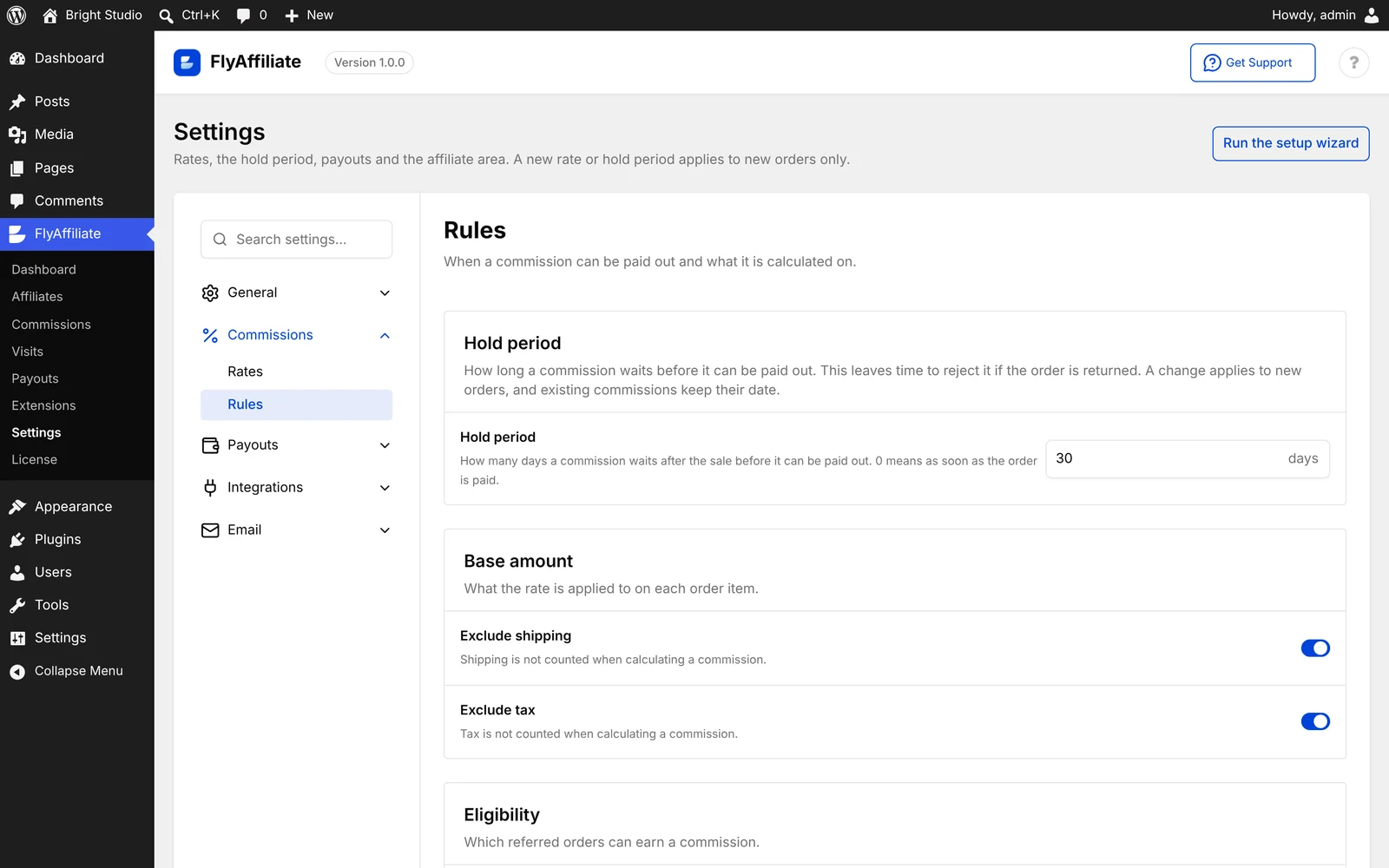
The hold period is the waiting time before a commission can be paid out. FlyAffiliate sets it to 30 days the moment you install it.
That window gives refunds time to show up before money leaves your account. Turn on Reject commissions on refund in the settings, and a refunded order cancels its unpaid commission automatically. Need faster payouts for trusted partners? Set the hold to 0 and commissions can be paid as soon as the order is paid.
A Commission Ledger That Follows the Order
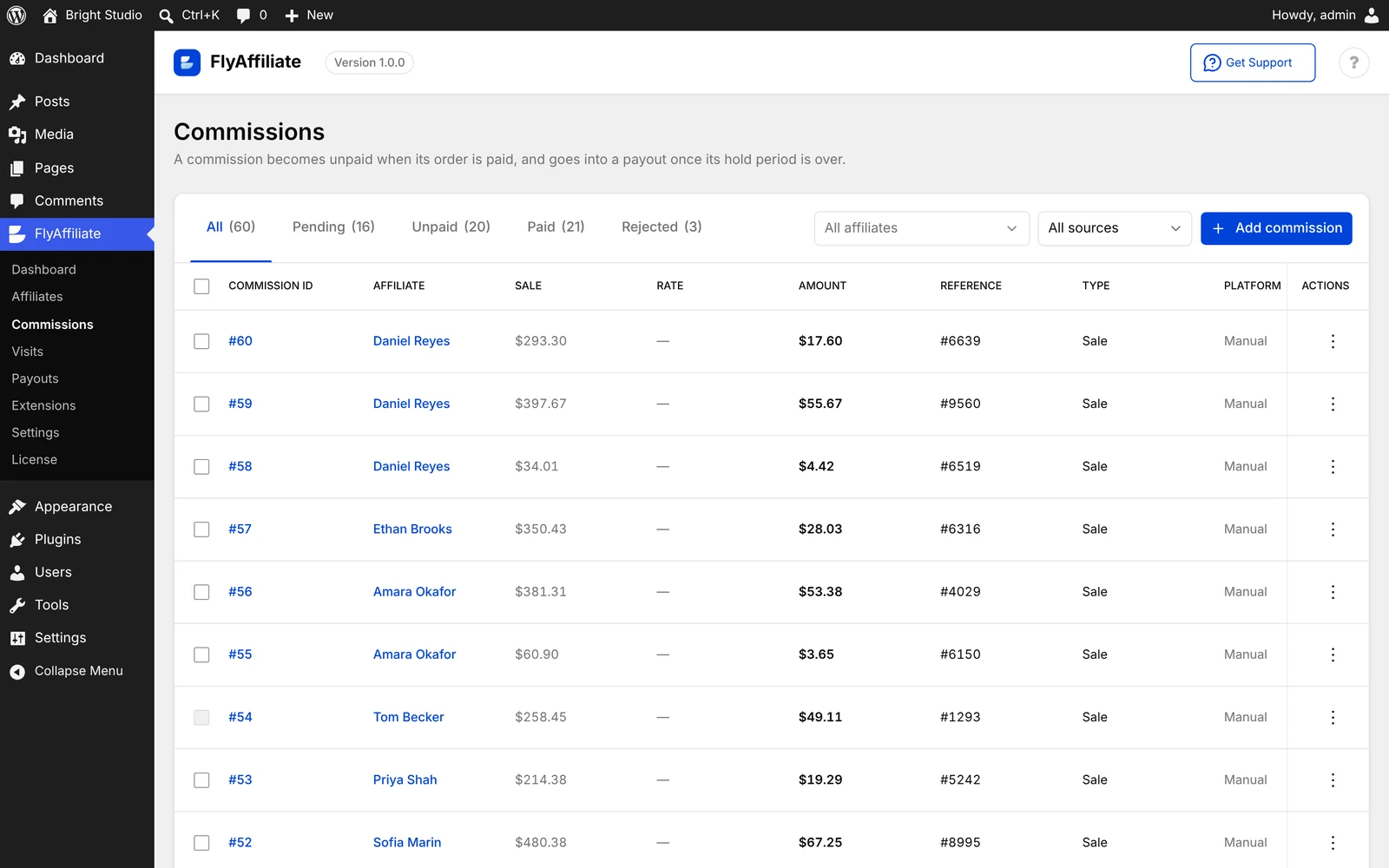
This is where affiliate commission tracking gets honest. Every commission sits in one of four states, pending, unpaid, paid or rejected, and it moves with the order behind it.
A failed or cancelled order rejects its commission, and every rejected commission records why, such as “Order #1400 was refunded.” A recovered order brings the commission back. Paid commissions are never quietly reversed, so your books and your affiliates’ books always match. You can also add commissions by hand for bonuses, corrections or offline sales.
Batch Payouts With a Preview and CSV Export
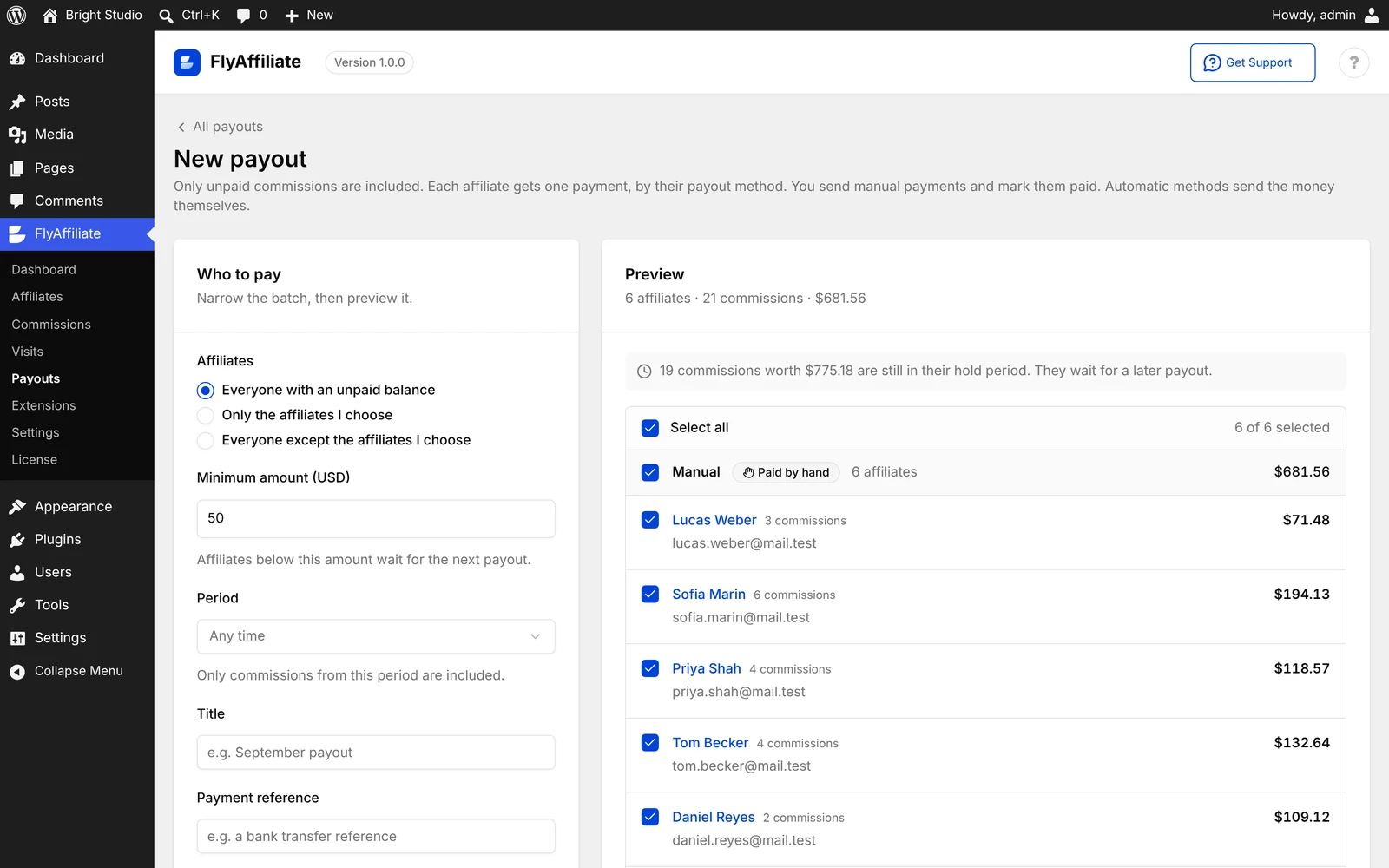
Affiliate payouts happen in one go. You choose who to pay: everyone with a balance, only certain affiliates, or everyone except a few. FlyAffiliate then shows a preview with each person’s amount, payment details and method.
A minimum payout, 50 in your store currency by default, keeps tiny balances rolling over to the next round. The free plugin uses the Manual method. You send the money your usual way, then mark each payment paid in one click. Export the whole batch as a CSV for your accountant.
Dashboards for You and for Your Affiliates
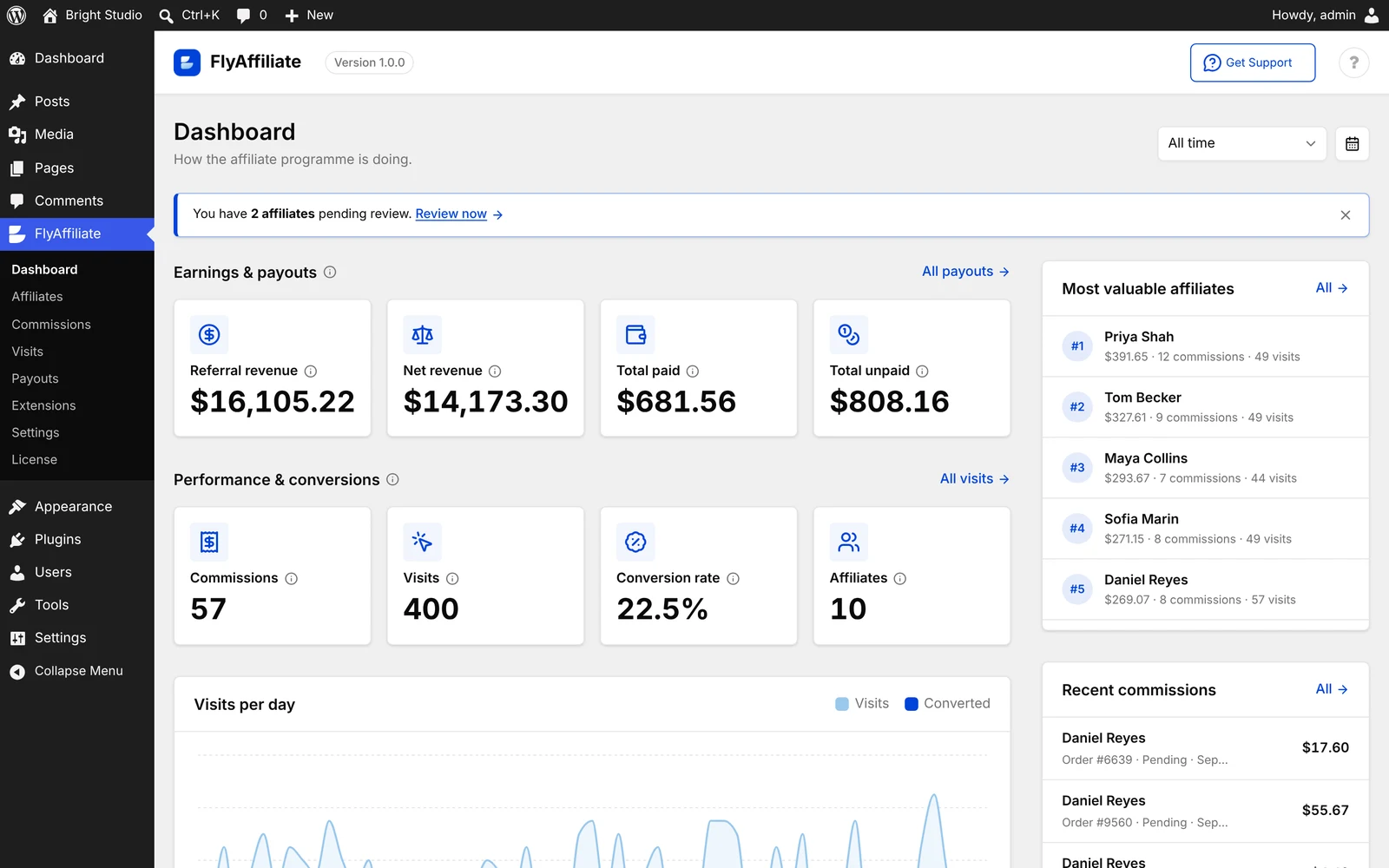
Your admin dashboard shows referral revenue, total paid, total unpaid, visits, conversion rate and your most valuable affiliates. If you use WooCommerce, an Affiliate Commission box also appears in WooCommerce Analytics.
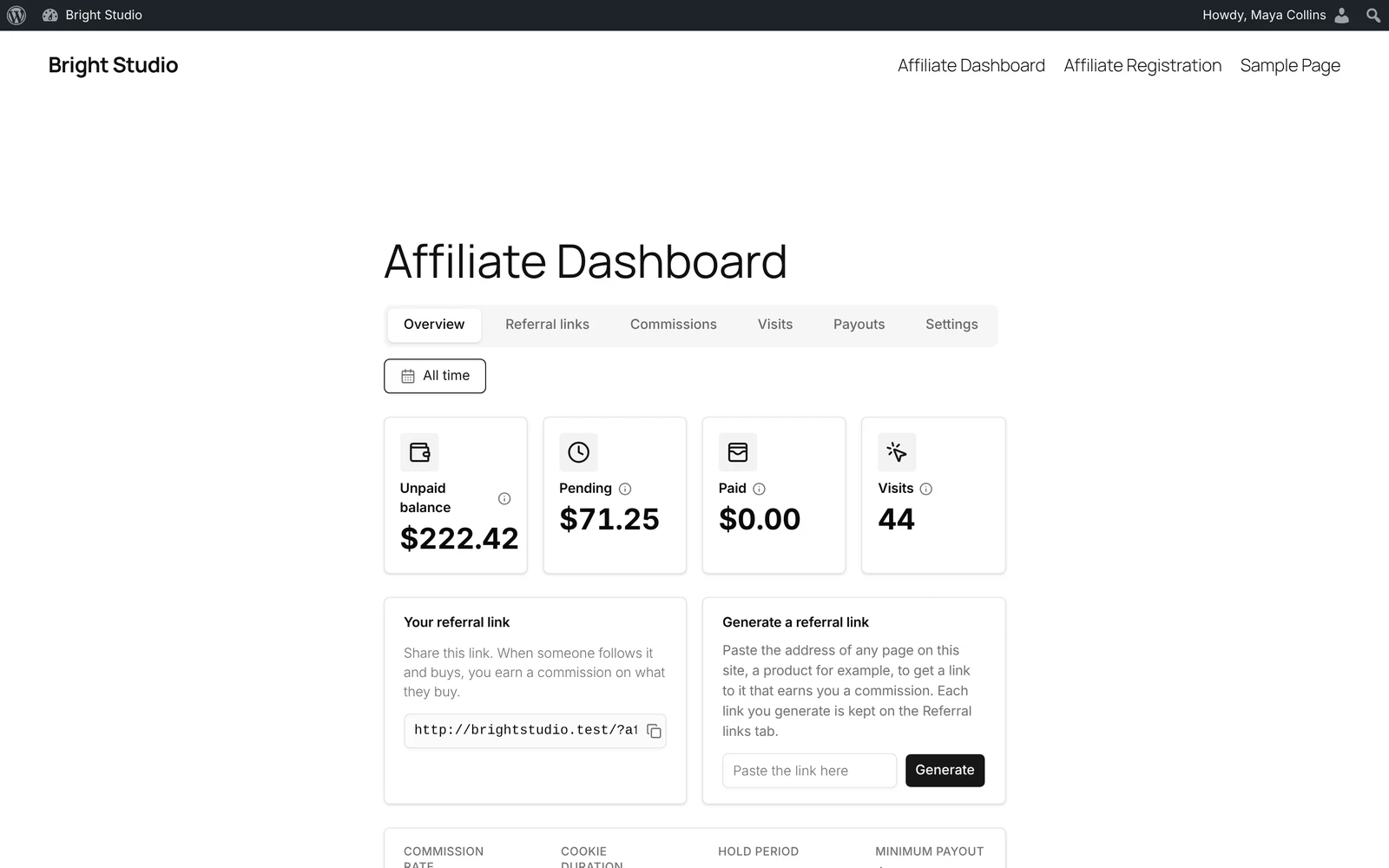
Affiliates get their own dashboard on your site. They see their referral link, balance, commissions, visits and payouts. A link generator lets them build a referral link for any page. They also see your program terms, including the rate, attribution window, hold period and minimum payout, so fewer questions land in your inbox.
Privacy That Keeps Visitor Data on Your Site
FlyAffiliate does not store identifying data about visitors. A visit record keeps only a salted hash of the IP address and browser details, which cannot be reversed.
Attribution uses one first-party cookie on your own domain. It holds two numbers, the affiliate ID and the visit ID, and no third party ever reads it. Your visitor data never leaves your site.
Room for Developers to Extend It
Developers get a REST API, around 160 hooks, templates they can override in a theme, and WP-CLI commands. The code follows the same structure as Dokan, so anyone who has built on Dokan will feel at home.
What FlyAffiliate Pro Adds
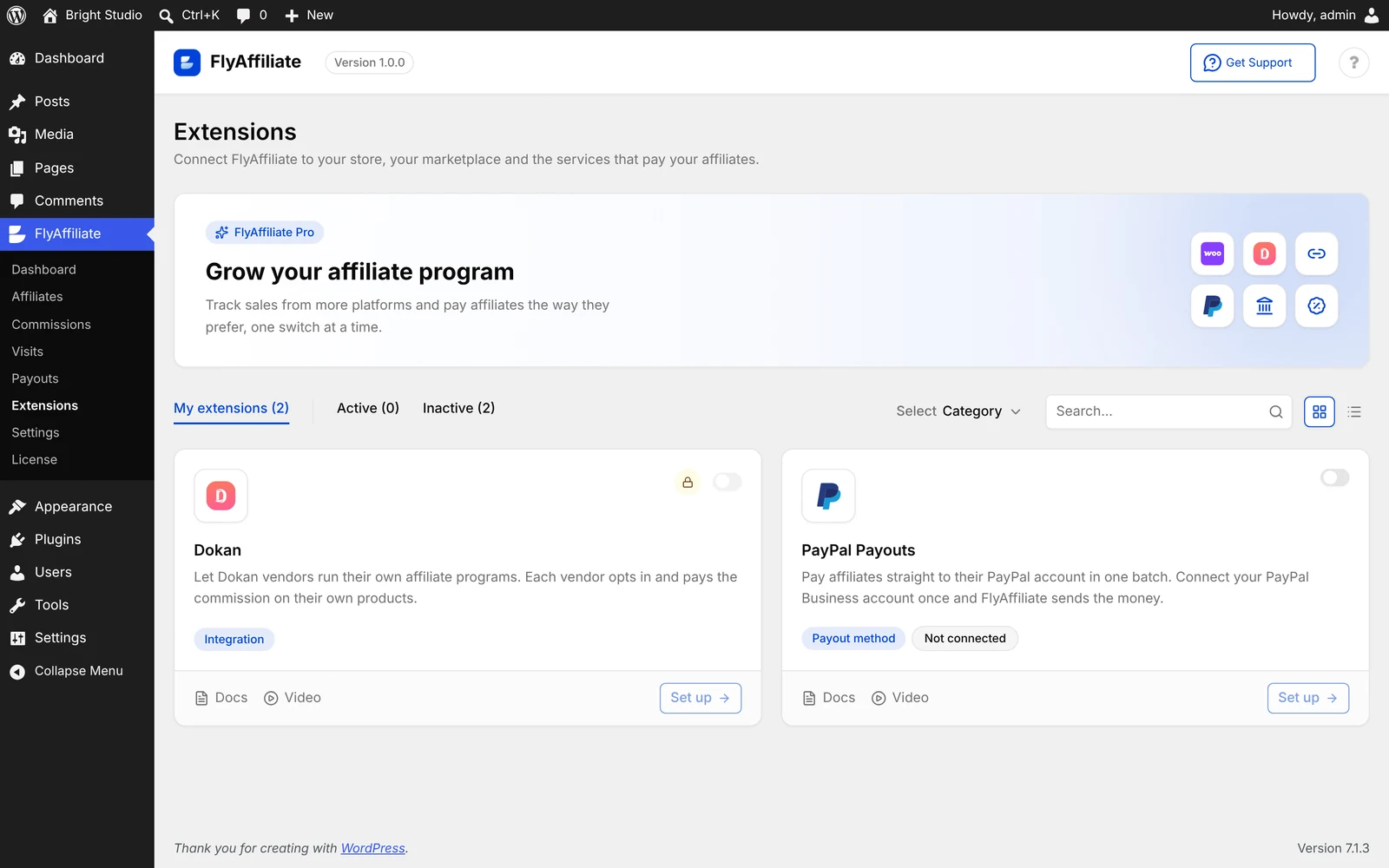
FlyAffiliate Pro is a paid add-on that switches on extensions from one Extensions page. Version 1.0.0 ships two.
PayPal Payouts
PayPal Payouts sends money straight to each affiliate’s PayPal account in a single batch. You connect your PayPal Business account once, and affiliates add their PayPal email in their dashboard.
Each payment shows its real status, from sent to paid, on hold or unclaimed. A failed payment stays unpaid so you can send it again. It is never marked paid by mistake. One payout can also mix methods, so PayPal payments send themselves while manual ones wait for you to mark them paid.
Vendor-Run Affiliate Programs for Dokan
Running a marketplace? The Dokan extension lets every vendor run their own affiliate program. Each vendor opts in, picks a rate within your limits, and pays the commission from their own earnings.
Here is how one sale splits. A customer pays $100. Your marketplace keeps its 20%, which is $20. The vendor’s affiliate rate is 15%, so the affiliate is owed $15. The vendor takes home $65, and your cut stays whole. Vendors who do not opt in are not affected.
It needs WooCommerce and Dokan 5.3.2 or newer. Dokan Pro is optional.
FlyAffiliate Pricing
The core FlyAffiliate plugin is free forever. You only pay if you want FlyAffiliate Pro and its extensions. Every Pro plan includes all Pro features, and you can pay yearly or choose a one-time lifetime option. Each plan also comes with a money-back guarantee.
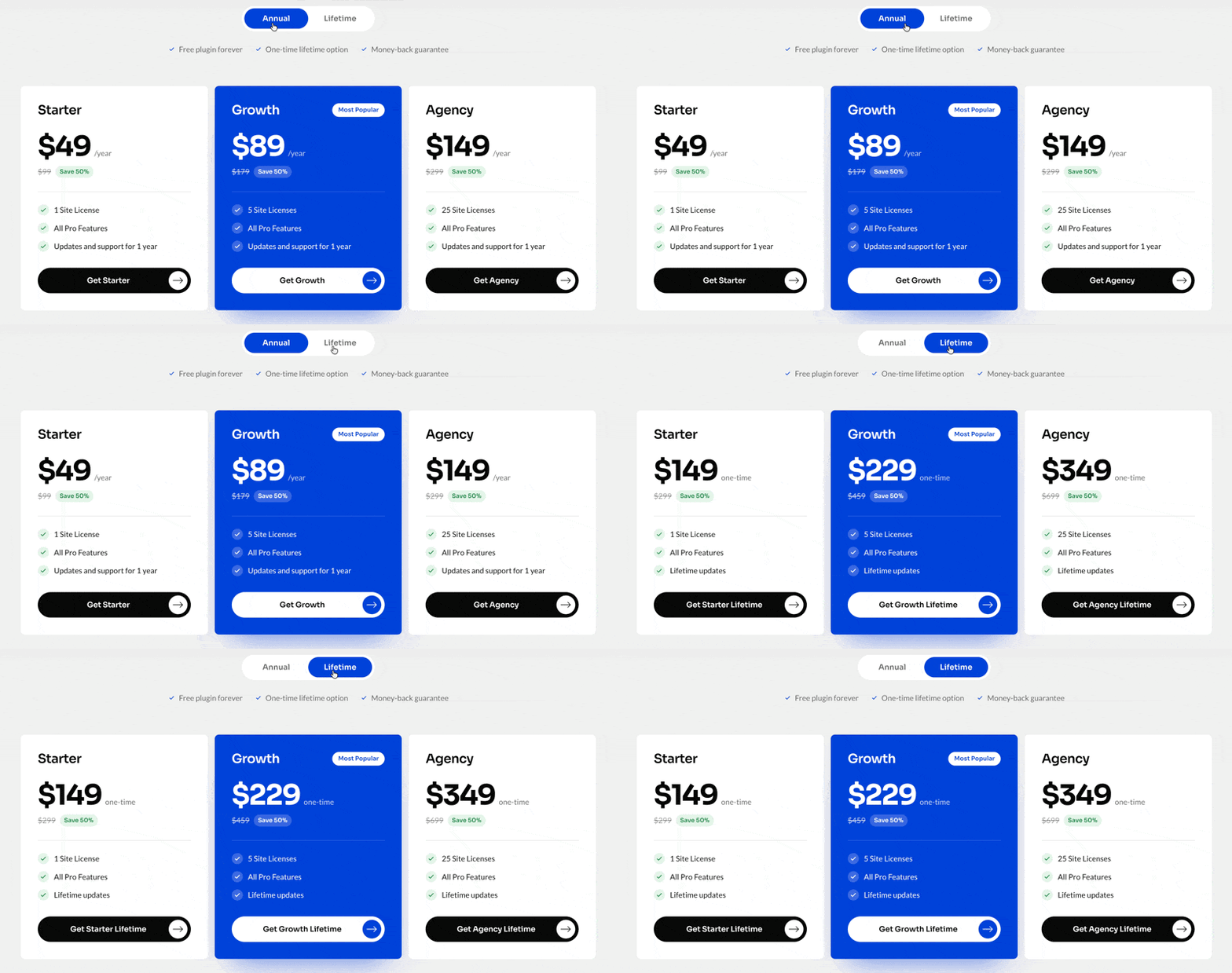
FlyAffiliate Pro comes in three plans, each available as a yearly subscription or a one-time lifetime purchase. Here is how they compare at the time of writing:
| Plan | Sites | Annual price | Lifetime price (one-time) |
|---|---|---|---|
| Starter | 1 site | $49/year | $149 |
| Growth (most popular) | 5 sites | $89/year | $229 |
| Agency | 25 sites | $149/year | $349 |
Annual plans include updates and support for 1 year. Lifetime plans are a single payment with lifetime updates, so at current prices a lifetime plan costs about the same as three years of annual renewals or less. All plans are currently 50% off their regular price, and every plan unlocks the same Pro features, so pick the one that matches how many sites you run. For the latest prices and deals, see FlyAffiliate Pro plans.
FlyAffiliate Pros and Cons
Pros
- Complete for free. Per-item commissions, the hold period, both dashboards, batch payouts and CSV export cost nothing.
- Safe out of the box. The 30-day hold and the order-following ledger protect your margin before you touch a setting.
- Fair commission math. Shipping and tax are left out by default, and a maximum rate caps every commission.
- Privacy-friendly tracking. One first-party cookie and hashed visit data, all on your own server.
- Built by a team that knows WooCommerce. weDevs builds Dokan, so the Dokan extension handles real marketplace money rules, like split orders and vendor refunds.
Cons
- Single-tier only. FlyAffiliate runs single-tier programs with percentage rates. If you need multi-level commissions, it is not built for that.
- Manual payouts in the free version. Automatic PayPal Payouts need FlyAffiliate Pro.
- Vendor-run programs need Pro. Marketplace owners need the Pro Dokan extension to let vendors fund their own affiliates.
Who Should Use FlyAffiliate?
WooCommerce Store Owners
Say you sell handmade candles. You want ten lifestyle bloggers to promote your new fall scent. With FlyAffiliate as your WooCommerce affiliate plugin, each blogger gets a link, every order is tracked per item, and payday is one batch instead of ten transfers. It is a simple way to start an affiliate program for WooCommerce without a monthly platform fee.
Dokan Marketplace Owners
A marketplace with hundreds of vendors cannot fund affiliates for everyone. With FlyAffiliate Pro, vendors who want more traffic fund it themselves. Affiliates even see how much they can earn right on each product page, which gives them a reason to share. If you are still planning the store, this guide on how to run a multivendor marketplace covers the basics.
WordPress Sites Without a Store
FlyAffiliate also runs without WooCommerce. A coaching business or an agency can track referral links, add commissions by hand when a referred client signs, and still pay partners in clean batches.
Owners Who Care About Privacy
If you would rather not send visitor data to an outside platform, FlyAffiliate keeps tracking on your own server. That makes your privacy story easier to tell your customers.
How to Set Up FlyAffiliate
Install and activate FlyAffiliate from your WordPress dashboard, and a setup wizard opens. It asks for the three numbers every program needs: your default rate, your maximum rate and your hold period.
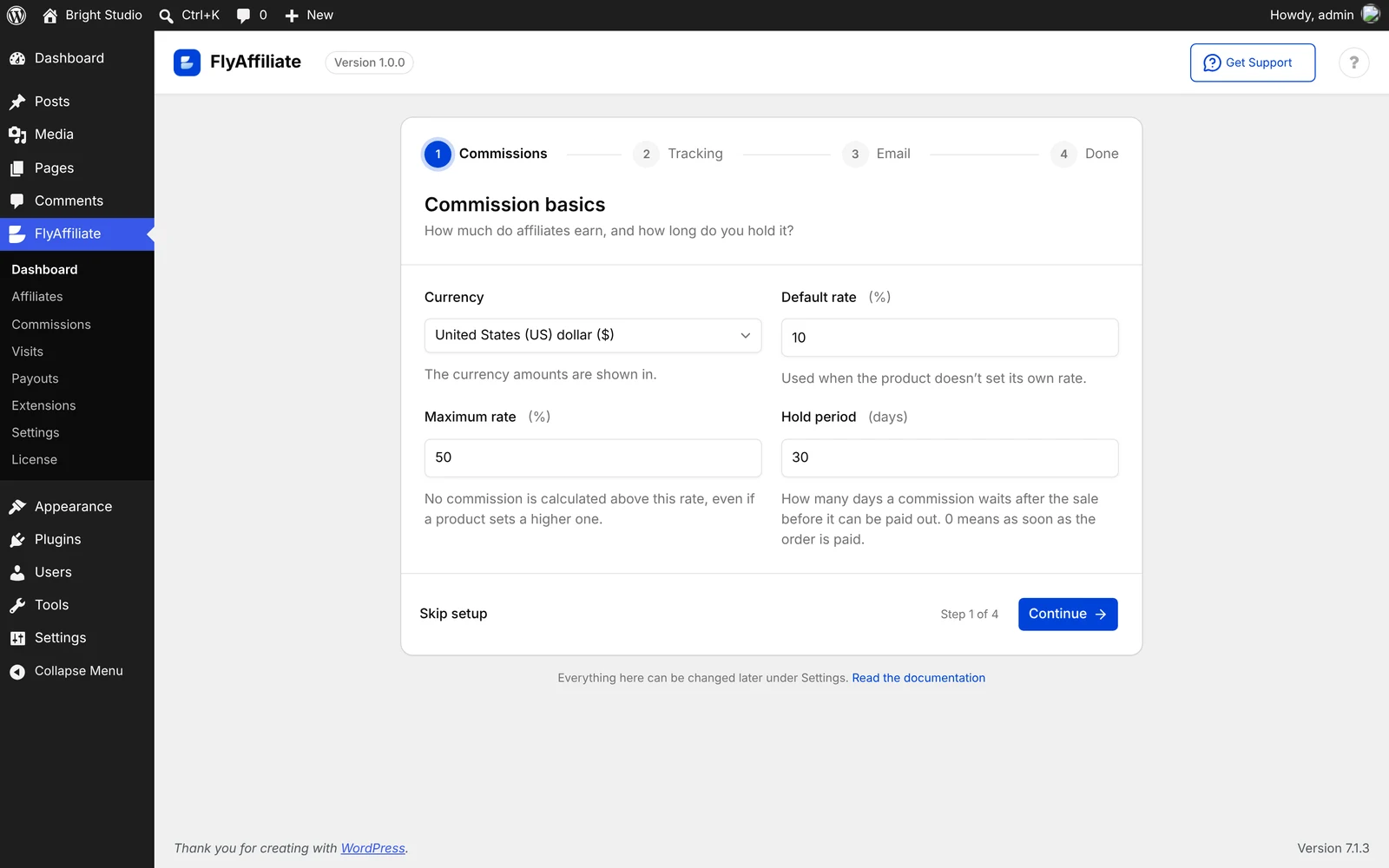
FlyAffiliate also creates your affiliate dashboard and registration pages for you. Add the registration page to your menu, invite your first partners, and you are live. For every setting in detail, read the FlyAffiliate setup guide.
Final Verdict: Is FlyAffiliate Worth It?
If you want a WordPress affiliate plugin that gets the money side right, FlyAffiliate is easy to recommend. The free version already covers per-item commissions, a default hold period, an honest ledger, batch payouts and dashboards for both sides, with visitor data kept on your own site. Pro is worth it if you want automatic PayPal payouts or run a Dokan marketplace. Just skip it if you need multi-level commissions, because it is not built for that, and it does not pretend to be.
Frequently Asked Questions
What commission rate should I offer affiliates?
Start with a rate your margin can carry on every sale, then adjust once you see which partners convert. You can change the rate any time. A new rate applies to new orders only, so existing commissions keep the rate they earned.
Can affiliates earn a commission on their own orders?
Not by default. FlyAffiliate blocks self-referrals out of the box. You can allow them in the settings if you run a program where personal purchases should count.
Can I change how long a referral lasts?
Yes. The attribution window can be any number of days. Set it to 0 and a referral lasts only until the visitor closes their browser.
Do I need cookie consent for affiliate tracking?
That depends on the privacy laws where you and your visitors are. FlyAffiliate uses one first-party cookie on your own domain and no third-party cookies. List it in your cookie policy and ask a privacy adviser what your region requires.
Is FlyAffiliate a multi-level marketing plugin?
No. FlyAffiliate pays one affiliate per order, and the last click wins. There are no tiers or downlines, by design.
Start Your Affiliate Program Today
Your best marketers might already be your customers. FlyAffiliate gives them a link, gives you a ledger you can trust, and keeps your payouts fair. If you have been looking for a WordPress affiliate plugin that handles the money side properly, download FlyAffiliate free and set up your first program this week.




 Email Subscription Request


Add your first comment to this post