

 0
0 A flash sale goes live. Your post hits the front page of Reddit. The traffic spike you’ve been dreaming of is finally here, but your server just gave up. You’re not cheering; you’re watching revenue disappear in real-time. This isn’t a hypothetical scenario; it’s the harsh reality for any high-growth site on a brittle hosting platform.
We’ve seen this happen firsthand. Many people build a site on what they thought was “premium” shared hosting, but can’t handle a simple product launch. As a result, they lose sales and trust. That’s why for mission-critical sites, you’re not buying hosting; you’re actually buying resilience.
This is where 20i makes a compelling case. This UK-based autoscaling cloud platform is purpose-built to handle unpredictability. It combines always-on uptime with a smart, proactive scaling system. In this 20i review, we’ll cut through the marketing copy and examine if it’s the right engine for your high-stakes website.
Quick Navigation
What Is 20i and Why Does Its Architecture Matter?
20i hosting is a high-performance, autoscaling cloud platform built to proactively prevent server overload and downtime. Unlike traditional fixed-resource models where your site is constrained by a single server’s limits, 20i’s cloud infrastructure dynamically allocates more CPU and RAM as traffic increases.
Think of it less as a single server and more as a flexible, self-optimizing network designed to absorb massive traffic spikes without manual intervention.
The Core Features That Drive 20i’s Performance
What makes 20i more than just another hosting provider? It’s the technology under the hood. From instant autoscaling to ultra-fast CPUs, these core features work together to keep your site fast, stable, and ready for anything the internet throws at it.
1. Truly Elastic Autoscaling Prevents Downtime Before It Happens
The magic of 20i’s architecture is its preventative autoscaling. Most “cloud” hosting only scales reactively, often after your site is already bogged down. 20i monitors for rising load and automatically allocates additional CPU and RAM before your site’s performance degrades. This isn’t just about recovering from an issue; it’s about preventing one entirely, ensuring your site remains responsive during the most critical moments.
2. High-Frequency 4.2 GHz Compute Nodes Deliver Unparalleled Processing Speed
The 4.2 GHz processors are not just a marketing number; they are a critical differentiator. Many hosts use older, lower-frequency CPUs designed for density, not speed. A higher clock speed (GHz) means faster single-thread performance, which is vital for quick database queries and PHP processing, the engine room of any WordPress site. This directly translates to faster Time to First Byte (TTFB) and a perceptibly snappier user experience, especially on dynamic content.
3. A Pre-Caching CDN That Actually Speeds Up the First Visit
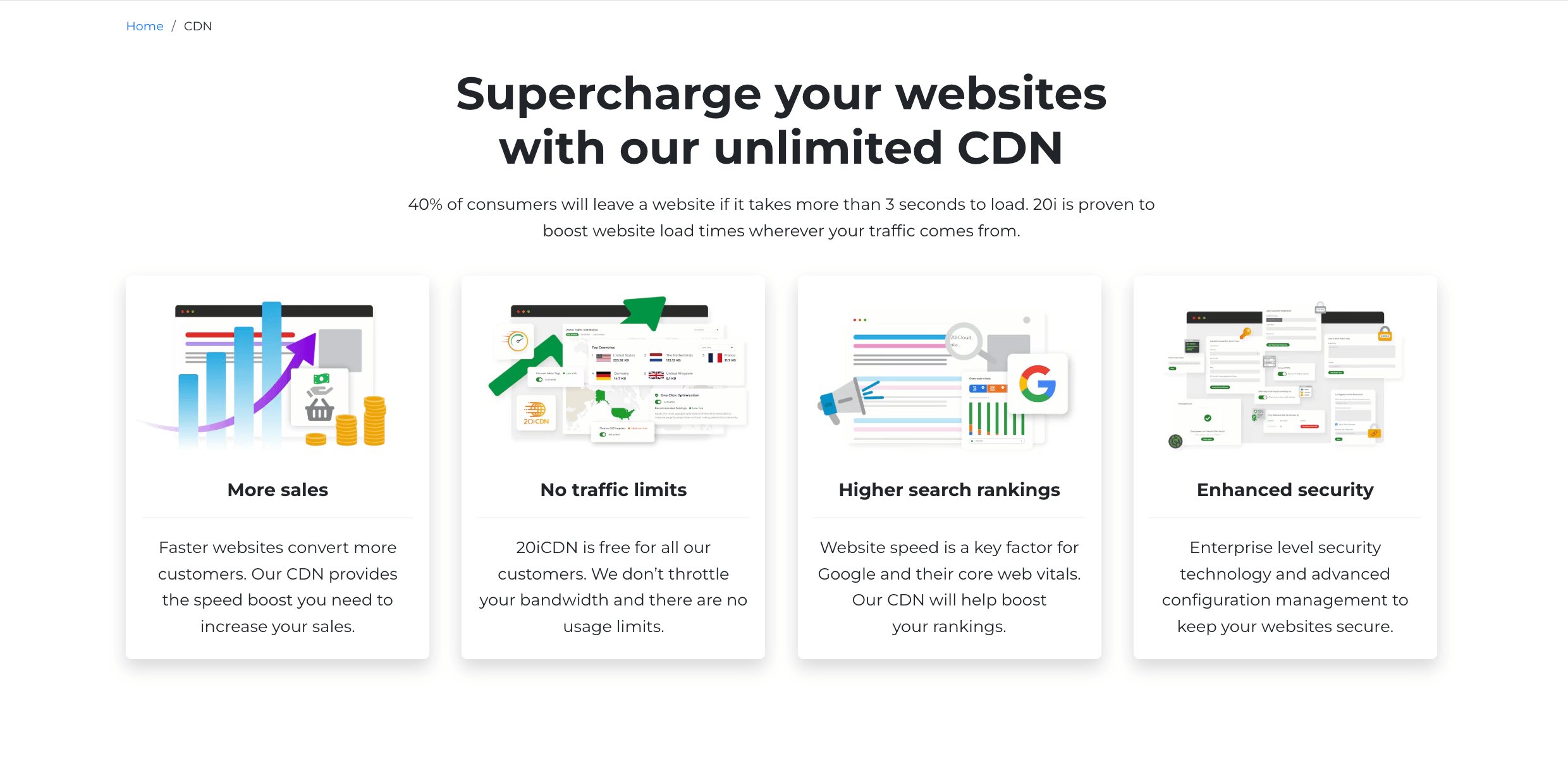
The standard CDN model is reactive: a visitor from Sydney has to be the first to request a page before it’s cached on a local node. 20i’s CDN is intelligent and proactive, automatically pushing your content to its global network of nodes before the first visitor arrives. This means even a first-time visitor in Australia gets a near-instant page load, making the global user experience consistently excellent from the very first click.
According to the Hostingstep WordPress benchmarks on top hosting providers, CDN plays a vital role in not only improving TTFB but also impacts the load handling response time and core web vitals performance. Hence, 20i with CDN will be a vital hosting solution for your business websites.
4. WordPress Manager: Bulk Management That Reclaims Your Team’s Time
For agencies and businesses managing multiple WordPress sites, this feature is a workflow game-changer. The dashboard allows you to manage plugins, themes, and users across your entire portfolio from a single, centralized view. Instead of logging into dozens of individual wp-admin panels to run updates, you can handle them in bulk with a few clicks. This isn’t a small perk; it’s a productivity tool that can save hours of repetitive, low-value work every week.
5. Other Value-Adds
- Free SSL certificates for every site, managed automatically.
- Daily backups (with some limitations on certain plans).
- Staging environments for safe development and testing.
- 24/7 UK-based support with a reputation for deep technical expertise.
Hands-On: Launching a Site with 20i Autoscale
Setting up hosting can sometimes feel like navigating a maze. But with 20i’s Autoscale packages, the process is refreshingly straightforward. In this section, I’ll walk you through my firsthand experience, so you know exactly what to expect when you get started.
1. Add Your First Website
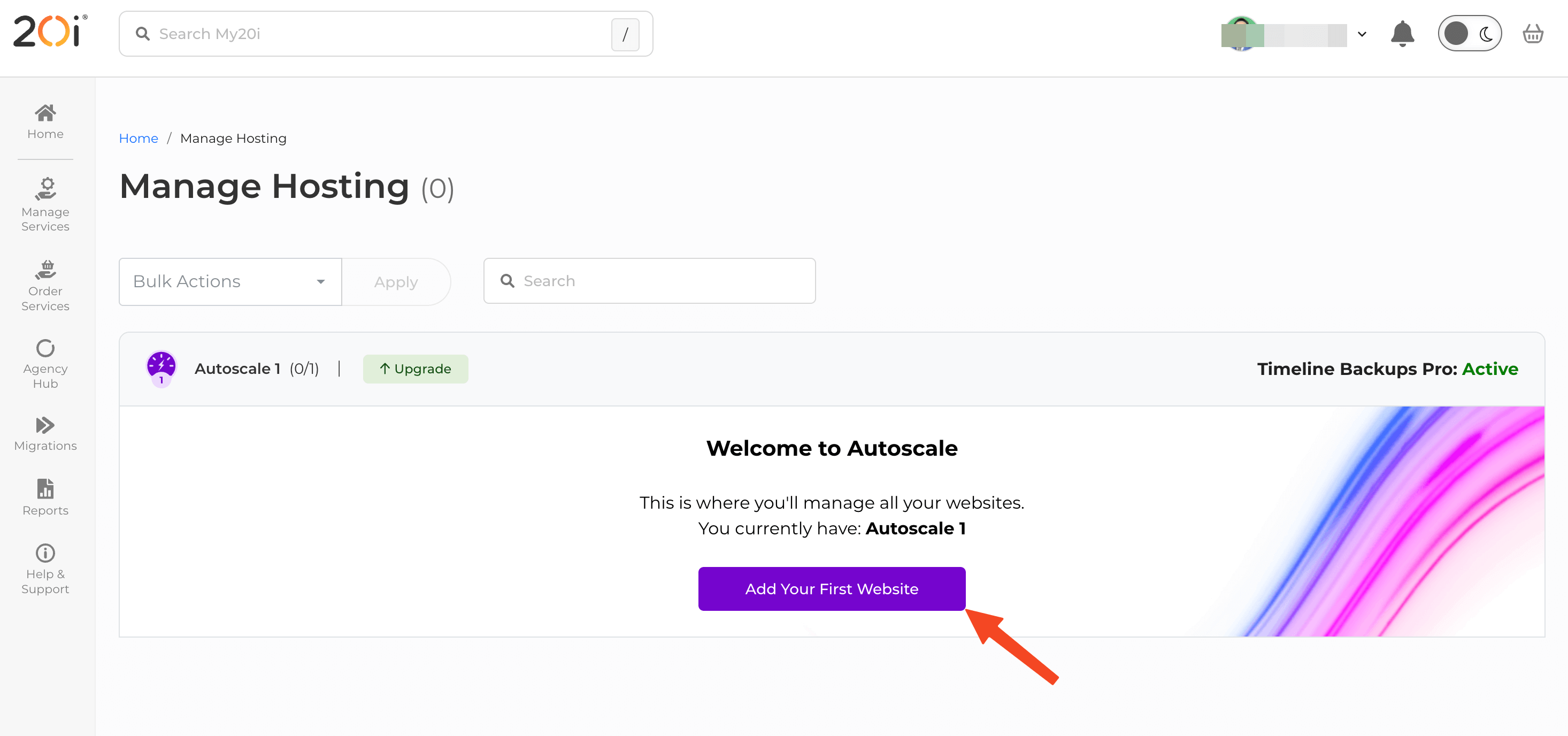
At first you need to create an account and buy your deisred hosting plan. We chose the Autoscale 1 plan. After logging in, you’ll see the website adding wizard. Click on the “Add Your First Website” button to initiate the process.
The next screen will let you choose a a datacentere location, the type of website you want to build (i.e. WordPress, Joomla, PHP, etc.)
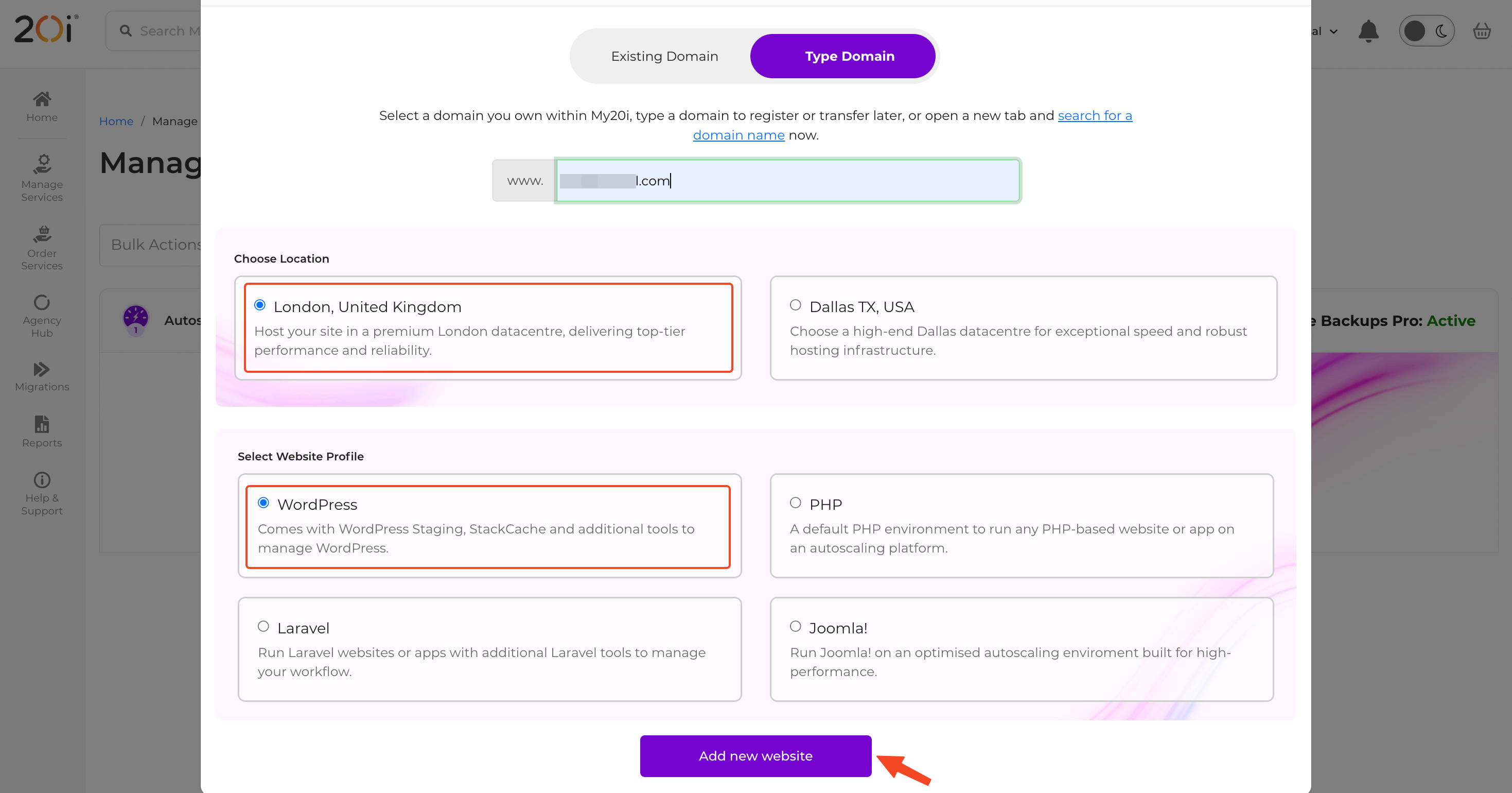
Hit the “Add new website” button after providing the required information. Wait for a few seconds, and your website will become ready.
2. Manage Your Autoscale Hosting
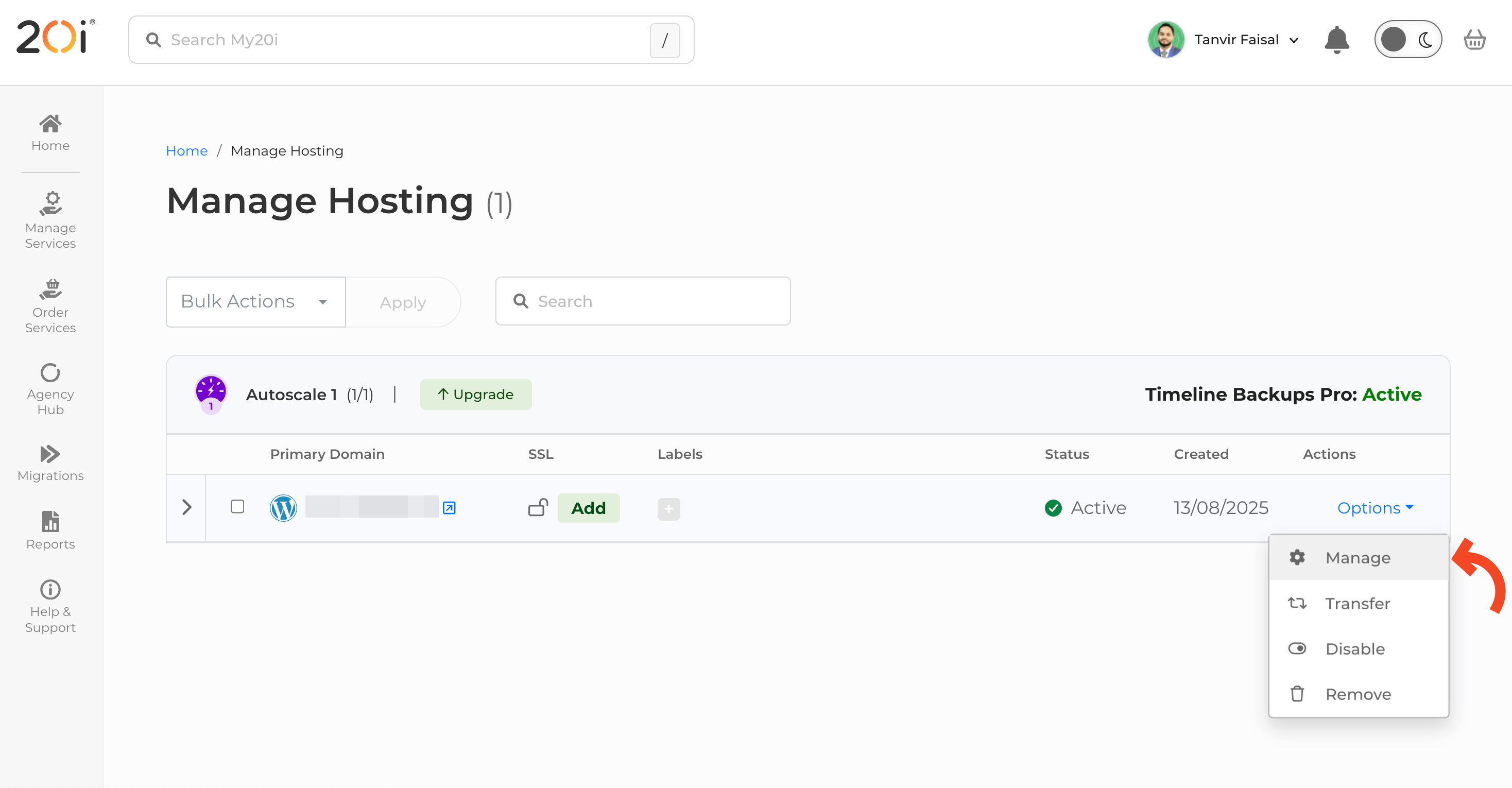
Go to your hosting management page where the newly added domain is listed. Click on the top right dropdown “Options” and choose Manage.
You’ll be redirected to the package’s service overview page. Here you can control every aspect of the website and hosting package as the following image:
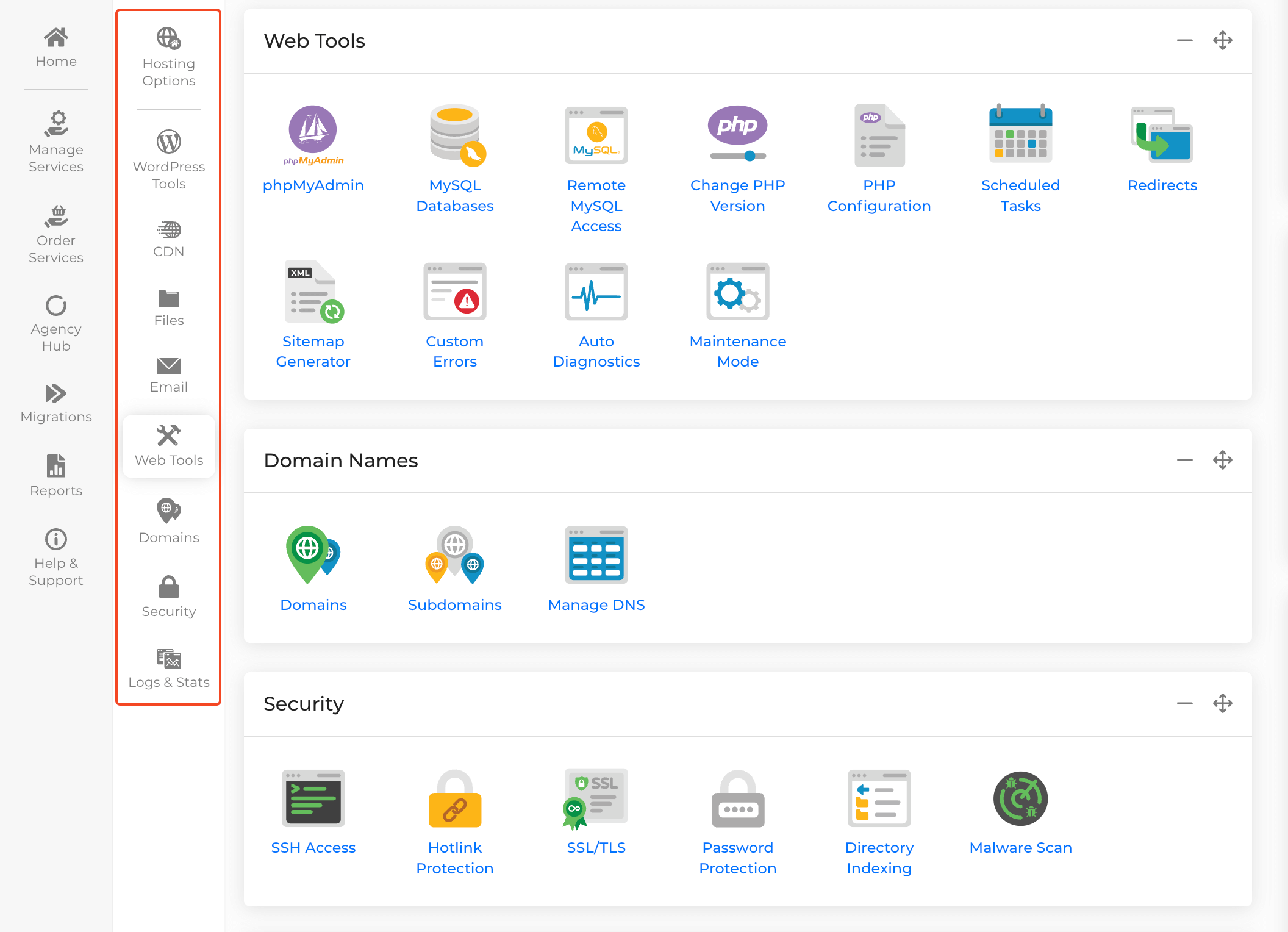
Here’s a quick glimps of the important settings under each tool category:
| Category | Tools / Features | Purpose |
|---|---|---|
| WordPress Tools | Version Checker | Check WordPress version at a glance |
| WordPress Admin | Quick dashboard access | |
| Reinstall WordPress | Fresh install in one click | |
| Plugins & Themes | Activate, deactivate, and update across sites | |
| CDN & Performance | Edge Caching | Pre-caches content globally for faster load |
| Website Optimisation | Auto-optimize images, CSS, JS, and speed | |
| Block Visitors | Restrict by IP or country | |
| Cache Report & Security Headers | Ensure caching and control security settings | |
| Web Files | File Manager & FTP Accounts | Manage files and access permissions |
| Backup/Restore & Timeline Backups | Create and access daily backups | |
| File Permissions Checker | Verify and fix file security | |
| Git Version Control | Integrate with GitHub for collaborative dev | |
| Email Accounts & Forwarders | Create and manage mailboxes | |
| Send-/Receive-only Addresses & Junk Filters | Configure mailbox types and spam control | |
| DomainKeys (DKIM) & DMARC Wizard | Improve deliverability and reduce spam | |
| Web Tools | Databases & phpMyAdmin | Manage MySQL databases and remote access |
| PHP Settings & Scheduled Tasks | Adjust versions, configuration, and cron jobs | |
| Redirects, Sitemaps & Custom Errors | Optimize site structure and UX | |
| Maintenance Mode & Auto Diagnostics | Test changes safely and check for errors | |
| Domains | Domains & Subdomains | Add, remove, and manage domains |
| DNS & Nameservers | Configure DNS records and manage DNSSEC | |
| Domain Privacy & Transfers | Control privacy and transfer domains easily | |
| Security | SSH Access & Hotlink Protection | Secure connections and prevent bandwidth theft |
| SSL/TLS & Password Protection | Encrypt connections and restrict access | |
| Directory Indexing & Malware Scan | Enhance security and scan for threats | |
| Logs & Stats | Access/Error & Mail Logs | Track activity and troubleshoot issues |
| Bandwidth Usage | Monitor traffic and load balancers |
Read the 20i official doc to learn more about how to manage your hosting with 20i Autoscale.
Performance & Uptime: The Data-Backed Resilience You Can Trust
20i’s architecture is a calculated strategy for performance under pressure, not a collection of features. The combination of proactive autoscaling, high-frequency CPUs, and a pre-caching CDN isn’t a coincidence; it’s a unified system designed for maximum resilience. When a hosting provider can guarantee that your site won’t blink during a traffic spike, you’re not just buying a faster server; you’re buying peace of mind.
Ease of Use: Is 20i’s Dashboard Beginner-Friendly or Agency-Ready?
20i’s control panel strikes a rare balance: it’s simple enough for a beginner to launch a site, yet powerful enough to manage dozens of them. While many hosting providers use bloated, outdated panels like cPanel, My20i is a custom-built, modern dashboard.
For the new user, this means a clean interface for deploying WordPress, managing email, and monitoring basic performance. For an agency, the built-in WordPress Manager is the real game-changer. The intuitive UI ensures that even junior team members can manage tasks without extensive training.
Pricing & Plans: Where 20i Fits in the Cloud Hosting Market
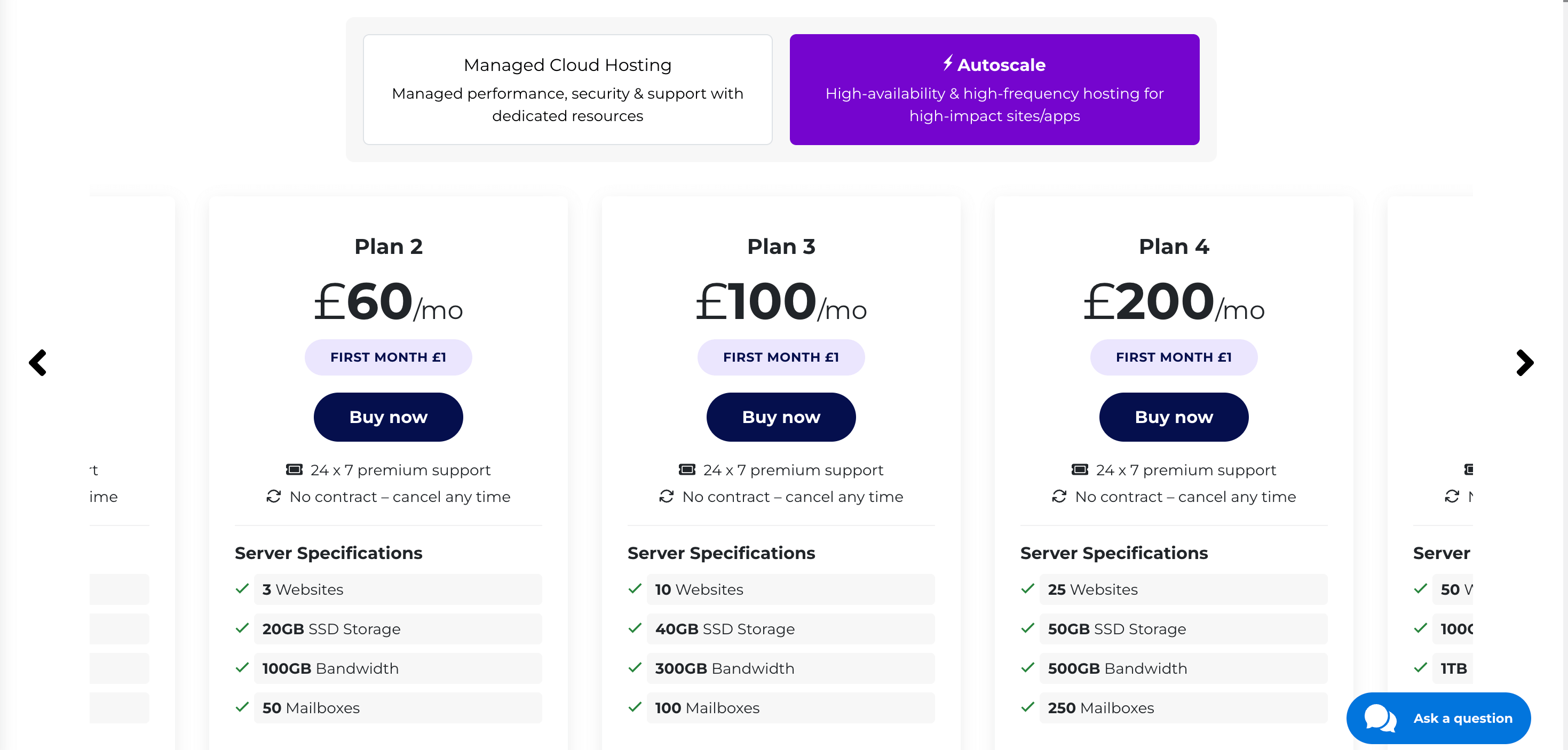
All 20i Autoscale plans come packed with powerful core features designed to keep your site fast, secure, and resilient. Every plan includes dynamic autoscaling with autoscaled PHP workers, high-frequency compute for lightning-fast processing, and a CDN with edge pre-caching to ensure global visitors experience instant page loads.
Security is built in with free SSL certificates and WAF plus malware scanning, while automatic daily backups safeguard your data. You also get fast, on-demand migrations and 24/7 expert support, making it easy to manage and maintain even the most demanding websites. Let’s have a look at all available Autoscale plans:
| Plan | Price / Month | Websites | Storage | Bandwidth | Best For |
|---|---|---|---|---|---|
| 1 | $30 | 1 | 10GB | 50GB | Solo sites, small blogs, testing |
| 2 | $60 | 3 | 20GB | 100GB | Small agencies, light e-commerce |
| 3 | $100 | 10 | 40GB | 300GB | Medium agencies, multi-site setups |
| 4 | $200 | 25 | 50GB | 500GB | Growing agencies, larger e-commerce |
| 5 | $400 | 50 | 100GB | 1TB | Enterprises, high-traffic multi-sites |
While the initial pricing is attractive, it’s crucial to understand the renewal costs. The key is to assess if the tangible performance benefits (fewer server errors, faster pages, peace of mind during traffic spikes) justify the long-term investment. Should you choose 20i? For a business where downtime costs more than a few extra pounds a month, the answer is a clear yes.
Pros & Cons of 20i: A Balanced View for an Informed Decision
Pros
- Truly Elastic Scaling: Proactively prevents downtime and slowdowns during unexpected traffic surges.
- Blazing-Fast CPUs: The 4.20 GHz processors are a tangible performance boost, especially for dynamic sites.
- Intelligent Pre-Caching CDN: Delivers a consistent, instant experience for visitors worldwide, even on their first visit.
- Powerful WP Bulk Management: A huge productivity tool for agencies and multi-site owners.
- Strong UK-based Support: Highly knowledgeable and accessible 24/7.
Cons
- Not the Cheapest Option: For a static site that gets minimal traffic, 20i might be overkill. The value is unlocked when performance and stability become a core business requirement.
Who Should Use 20i: The Strategic Use Cases
20i is not for every website; it’s for businesses and individuals who have a direct revenue or brand reputation link to their site’s performance.
- E-commerce Stores: For sites that run promotions, flash sales, or rely on paid ads. Downtime means lost revenue.
- Viral Content Sites: For news, media, or entertainment sites where traffic is unpredictable. Stability is the difference between a viral hit and a server error page.
- Marketing Agencies: For managing client sites where performance and security are non-negotiable, and the ability to bulk-manage a portfolio is a major time-saver.
- Fast-Growth Startups: For any business where a sudden influx of users or a critical product launch could otherwise overwhelm a less-resilient server.
Final Verdict: The Unbeatable Case for Resilience
For websites where downtime is not an option and traffic is unpredictable, 20i is arguably the most resilient hosting platform on the market.
This isn’t just about speed. It’s about a strategic infrastructure that proactively protects your site from the very real and costly problems of server overload. The combination of its proactive autoscaling, industry-leading 4.20 GHz CPUs, and intelligent CDN provides an unbeatable foundation for any site that needs to perform flawlessly under pressure.
Yes, you can find cheaper hosting, and you can find platforms with a different focus. But 20i delivers an impressive, hard-to-find balance of raw speed, unwavering stability, and powerful management tools. For mission-critical sites, it’s not an expense, it’s an investment in your business’s continuity and growth.




 Email Subscription Request


Add your first comment to this post