


 0
0 Shipping is one of the most crucial aspects for a profitable WooCommerce store. Set it wrong, and customers may abandon their carts; set it poorly, and you risk losing money on every order.
That’s why table rate shipping has become a game-changer for store owners.
With the right plugin, you can set up flexible, conditional shipping rules based on weight, order totals, quantity, or destination.
In this post, we’ll explore 7 WooCommerce table rate shipping plugins that actually work, so you can find the perfect solution for your store and make shipping as smooth as possible for you and your customers.
With that in mind, let’s explore the top table rate shipping plugins and see how they compare side by side.
Quick Navigation
Key Summary: What You’ll Learn in This Guide
- A side-by-side comparison of 7 plugins, covering free and premium options for different store sizes and needs.
- Why table rate shipping is essential for WooCommerce stores and how it improves both profits and customer experience.
- The must-have features to look for in a table rate shipping plugin (flexibility, ease of use, scalability, and support).
- In-depth breakdowns of each plugin’s features, pros, and cons, so you can quickly evaluate the right fit.
- Clear recommendations on which plugin works best, depending on whether you run a small shop, a growing store, or need advanced shipping logic.
Comparing the Top Table Rate Shipping Plugins at a Glance
When choosing a table rate shipping plugin, it helps to see how each option stacks up at a glance.
Here’s a quick comparison of the top 7 WooCommerce table rate shipping plugins, highlighting their key features, ease of use, and suitability for different store needs:
| Plugin | Free/Paid | Flexibility | Ease of Use | Best For |
| WowShipping | Free + Paid | Advanced conditional rules, multiple methods per cart | Very user-friendly | Stores with complex shipping needs |
| Flexible Shipping by Octolize | Free + Paid | Weight, order total, quantity rules | Easy | Small to medium stores |
| PH Table Rate Shipping Pro | Paid | Conditional rules, per item and order | Moderate | Stores needing premium features |
| WooCommerce Table Rate Shipping | Paid | Official plugin, conditional rules | Moderate | WooCommerce enthusiasts seeking official support |
| Advanced Table Rate Shipping by Acowebs | Free+ Paid | Custom rules, zones, and multiple shipping methods | Moderate | Medium stores with detailed needs |
| Custom Shipping Methods for WooCommerce | Free + Paid | Create custom shipping methods, conditional rules | Easy | Stores that need highly customizable shipping options |
| Table Rate Shipping for WooCommerce | Paid | Multiple shipping conditions, per order/item rules | Moderate | Stores with advanced shipping needs |
This comparison gives a clear snapshot of what each plugin brings to the table. Depending on your store size, shipping complexity, and budget, you can quickly identify which plugin is the best fit.
Next, let’s see what table rate shipping is and what its benefits are.
Understand Table Rate Shipping: How It Works & Why It Matters

Every WooCommerce store owner has their unique shipping needs. Flat rates can feel restrictive, and offering free shipping all the time isn’t just practical. That’s where table rate shipping comes in – it’s like giving your shipping rules a superpower.
At its core, table rate shipping allows you to set custom shipping costs based on conditions like:
- Weight: Heavier items cost more to ship.
- Cart total: Free shipping for orders above a certain amount.
- Quantity: Discounts for bulk purchases.
- Shipping destination: Different rates for local, national, or international orders.
This flexibility doesn’t just help you cover shipping costs – it improves the checkout experience for your customers. Instead of guessing why shipping is $5 one day and $15 the next, they see a clear, fair, and logical pricing structure.
In short, table rate shipping is all about control. You decide how shipping behaves, your customers feel confident, and your store avoids unnecessary losses. It’s no wonder so many WooCommerce store owners turn to plugins to make this happen effortlessly.
Why You Need a Plugin for Table Rate Shipping
WooCommerce gives you basic shipping options out of the box, but if you want flexible, professional, and precise shipping rules, the default settings just don’t cut it.
Here’s why a dedicated table rate shipping plugin can make a huge difference:
- Advanced Conditional Logic: Charge based on weight, quantity, or order total without complicated workarounds.
- Multiple Shipping Methods for the Same Cart: Offer customers more choices – standard, express, or free shipping depending on their order.
- Zone-Based Pricing Made Easy: Set rates for local, national, or international destinations without manual calculations.
- Better Customer Experience: Clear shipping rules reduce confusion and cart abandonment.
- Time-Saving Automation: Once rules are set, the plugin handles everything automatically.
In short, a plugin turns shipping from a manual headache into a strategic advantage. It’s the reason most successful WooCommerce stores rely on table rate shipping plugins; they save time, prevent errors, and keep customers happy.
What Makes a Plugin Best for Table Rate Shipping?
Table rate shipping plugins can vary widely based on features and flexibility. To choose the right one for your WooCommerce store, you need to consider a few key factors:
Flexibility in Rule Creation
A good plugin should let you define rules based on weight, price, quantity, shipping zones, and product categories.
Ease of Use
The interface should be intuitive enough so you can set up complex rules without coding knowledge.
Compatibility
Seamless integration with WooCommerce core, other shipping methods, and extensions like coupons or discounts.
Performance
Even with multiple conditions, the plugin should not slow down your checkout or cart pages.
Scalability
As your store grows, the plugin should support advanced scenarios, multiple methods, and conditional combinations.
Support & Updates
Active development and responsive support ensure your shipping stays reliable long-term.
These factors will guide our comparisons and highlight why WowShipping often stands out as the overall best choice for flexible and scalable shipping solutions.
Next, let’s dive deeper into each plugin so you can understand its unique features and benefits in more detail.
Explore the Best WooCommerce Table Rate Shipping Plugins
1. WowShipping
WowShipping is a feature-rich WooCommerce table rate shipping plugin designed for stores that need advanced shipping rules without coding.
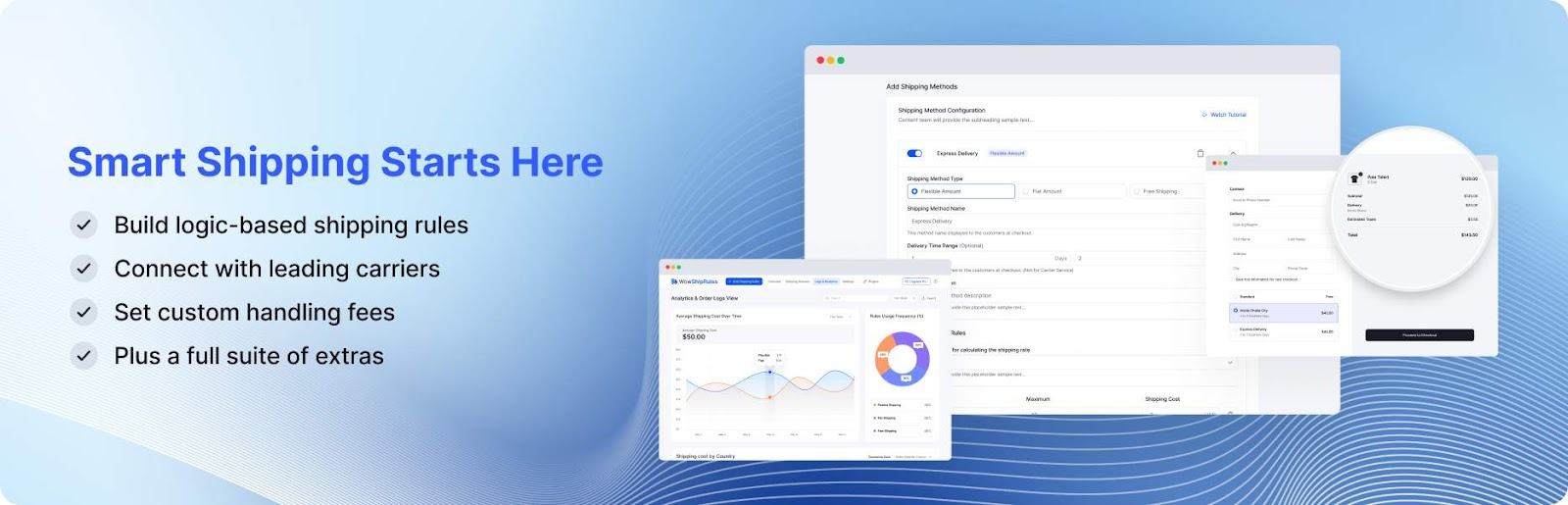
It allows store owners to create flexible shipping methods that adapt to different cart conditions, including weight, quantity, and destination. The plugin also supports multiple shipping methods for the same cart, giving customers more options at checkout.
Its intuitive interface makes setting up complex shipping rules simple, saving time while enhancing customer experience. WowShipping is ideal for medium to large stores that require granular control over shipping scenarios.
✅ Key Features:
- Create table rate shipping rules using multiple conditions like cart total, weight, quantity, or dimensions.
- Build rules based on cart, product, customer, or location specifics for precise control.
- Offer different methods, such as flat rate, free shipping, or express, for the same conditions.
- Connect with popular carriers to fetch real-time shipping rates.
- Show or hide shipping methods based on user login status.
- Add handling fees or adjust shipping costs using complex conditions.
- Combine conditions with AND/OR logic for highly targeted shipping rules.
- Monitor shipping rule performance and identify undercharging or overcharging instantly.
🟢 Pros:
- Very flexible and powerful
- No coding required
- Great for complex shipping needs
🔴 Cons:
- Relatively new plugin
- Might be overkill for small/simple stores
2. Flexible Shipping by Octolize
Flexible Shipping by Octolize is a versatile plugin that lets you create table rate shipping rules based on weight, order totals, and item quantities.
It is highly user-friendly and offers both a free and premium version, making it accessible to small and medium WooCommerce stores looking for reliable shipping control.
This plugin integrates seamlessly with WooCommerce and is a favorite among store owners for its simplicity and flexibility. With the premium version, you can unlock additional features like advanced conditions and shipping classes.
✅ Key Features:
- You can create shipping rules based on weight, order total, and quantity for precise control.
- The plugin offers both free and premium versions to suit different store needs.
- It supports conditional rules for advanced shipping setups.
- Seamless integration with WooCommerce ensures smooth operation.
- The interface is simple and intuitive, making setup quick and easy.
🟢 Pros:
- Beginner-friendly
- Flexible and scalable
- Free version available
🔴 Cons:
- Some advanced features are only available in the premium version
- Limited options for highly complex shipping rules
3. PH Table Rate Shipping Pro
PH Table Rate Shipping Pro by PluginHive is a premium WooCommerce plugin designed to handle complex shipping scenarios with ease.
It allows store owners to define shipping costs based on weight, quantity, subtotal, shipping class, and location. The plugin is ideal for stores that require precise control over shipping rules and want to automate calculations without manual intervention.
The setup is straightforward, and the interface is clean, making it easy to manage multiple shipping rules. It also supports multiple shipping methods simultaneously, allowing for flexible options at checkout.
✅ Key Features:
- Create unlimited shipping rules based on conditions such as product weight, quantity, total price, product categories, shipping classes, and more.
- Define shipping rates for different weight slabs, such as mail, small parcels, medium parcels, and large parcels.
- Set up complex shipping scenarios based on destination address by combining WooCommerce zones with weight-based, quantity-based, price-based, flat-rate, or free shipping options.
- Specify shipping options for specific countries without the need for WooCommerce shipping zones.
- Assign shipping costs to products based on their categories, facilitating bulk shipping strategies for similar products.
🟢 Pros:
- Powerful for complex shipping setups
- Saves time with automated calculations
- Supports multiple conditions
🔴 Cons:
- Paid plugin only
- It can be overwhelming for beginners
4. WooCommerce Table Rate Shipping
WooCommerce Table Rate Shipping is the official plugin from WooCommerce that allows store owners to create flexible shipping rules based on a variety of conditions, including weight, order total, and item quantity.
It is reliable, well-supported, and integrates seamlessly with WooCommerce, making it a trustworthy choice for both new and established stores.
The plugin provides a clear setup workflow and allows multiple shipping rates to be configured for different scenarios. Its official status ensures ongoing compatibility and support with WooCommerce updates.
✅ Key Features:
- Add multiple tables of rates per shipping zone, enabling complex shipping strategies tailored to different regions
- Choose from several types of table rate calculations
- Set costs per row, per item, as a percentage, or per weight unit, providing flexibility in pricing strategies
- Designed for ease of use, the plugin’s interface simplifies the process of adding, duplicating, and removing rates, making complex configurations more manageable
- Use wildcards to match multiple regions, enhancing the flexibility of shipping rules across different locations
🟢 Pros:
- Reliable and well-supported
- Good for both beginners and advanced users
- Seamless WooCommerce integration
🔴 Cons:
- Paid plugin
- Fewer advanced customization options compared to third-party plugins
5. Advanced Table Rate Shipping by Acowebs
Advanced Table Rate Shipping by Acowebs is a free WooCommerce plugin that allows store owners to create flexible shipping rules based on weight, cart total, quantity, and shipping zones.

It is particularly useful for medium-sized stores that want more control than WooCommerce’s default shipping options without investing in a premium plugin.
The plugin offers an intuitive interface and supports multiple shipping methods for different scenarios. Its simplicity, combined with flexibility, makes it a popular choice for store owners seeking a lightweight yet effective solution.
✅ Key Features:
- Set up unlimited shipping methods such as Standard, Express, and Free Shipping, each with its own set of rules and conditions.
- Define shipping costs based on various criteria, including cart total, weight, volume, item count, shipping class, and more.
- Apply conditions based on date/time ranges, specific days of the week, user roles, coupons, product categories, and custom taxonomies.
- Offer different shipping methods or rates based on the customer’s city, enhancing localized shipping strategies.
- Set up free shipping or apply discounts during special occasions or promotional periods
- The plugin is translation-ready and compatible with WPML, making it suitable for multilingual stores.
🟢 Pros:
- Free and accessible
- Easy to use
- Good for medium stores with moderate shipping needs
🔴 Cons:
- Limited advanced features
- May not suit very large or highly complex stores
6. Custom Shipping Methods for WooCommerce
Custom Shipping Methods for WooCommerce is a free plugin that lets store owners create completely custom shipping methods with their own rules and conditions. This makes it ideal for stores that require highly personalized shipping solutions beyond standard table-rate setups.

The plugin is beginner-friendly, integrates seamlessly with WooCommerce, and allows multiple shipping methods to coexist in one cart. Its flexibility makes it a solid choice for niche stores with unique shipping requirements.
✅ Key Features:
- Add multiple shipping methods with unique rules and conditions to your WooCommerce store.
- Utilize shortcodes in cost formulas to calculate shipping fees
- Assign shipping costs based on product shipping classes, with options to charge per class or per order.
- Add custom icons and descriptions for each shipping method to enhance the user experience
🟢 Pros:
- Highly customizable
- Free to use
- Good for niche or unique shipping needs
🔴 Cons:
- Advanced setups may require some learning
- Not as polished as premium plugins
7. Table Rate Shipping for WooCommerce
Table Rate Shipping for WooCommerce by Bolderelements is a premium plugin designed to provide multiple shipping conditions based on weight, order total, quantity, and shipping classes.
It is suitable for stores that need precise control over shipping rates and prefer a straightforward, professional plugin.
The interface is clean and easy to navigate, allowing store owners to set up multiple shipping methods quickly. Its premium support ensures compatibility and smooth performance with WooCommerce updates.
✅ Key Features:
- Define multiple shipping methods within a single shipping zone, each with its own set of rules and conditions
- Set shipping costs based on various factors, including order total, item count, weight, shipping class, and more.
- Utilize over 15 conditions to customize shipping rates, such as destination country, state, postal code, and cart contents.
- Charge shipping based on the entire order, individual items, or groups by shipping class, providing flexibility in shipping calculations.
- It is compatible with other WooCommerce extensions for seamless integration.
🟢 Pros:
- Reliable and professional
- Good for complex shipping setups
- Clean and easy-to-use interface
🔴 Cons:
- Paid plugin only
- Slightly less well-known compared to some competitors
Which Table Rate Shipping Plugin is Right for Your Store?
With so many options available, picking the right table rate shipping plugin can feel overwhelming. The best choice depends on your store’s size, shipping complexity, and budget. Here’s a quick guide to help you decide:
👉 For Complete Shipping Solution: If your store requires advanced conditional rules, multiple shipping methods per cart, and a complete solution overall, WowShipping is the top choice. Its intuitive interface and powerful features make it ideal for medium to large stores looking for flexibility without any coding.
👉 For Small to Medium Stores: Flexible Shipping by Octolize or Advanced Table Rate Shipping by Acowebs are great options. They provide essential table rate functionality, are easy to set up, and work well for stores with moderate shipping complexity.
👉 For Official WooCommerce Support: The WooCommerce Table Rate Shipping and PH Table Rate Shipping Pro plugins are excellent if you want official support and reliable updates. They work well for stores that prioritize stability and compatibility.
👉 For Custom or Niche Needs: Custom Shipping Methods for WooCommerce allows complete flexibility to create shipping methods tailored to your store. Table Rate Shipping for WooCommerce from Bolderelements is suitable for stores that need precise, professional shipping configurations.
No matter which plugin you choose, selecting one that aligns with your store’s requirements will save time, reduce errors, and improve your customers’ checkout experience.
FAQs on WooCommerce Table Rate Shipping
Does WooCommerce have built-in table rate shipping?
No. WooCommerce only offers basic shipping options (flat rate, free shipping, local pickup). You’ll need a plugin to set up advanced, conditional rules.
Which table rate shipping plugin is best for small stores?
For small to medium stores, Flexible Shipping by Octolize or Advanced Table Rate Shipping by Acowebs works best because they’re easy to use and have free versions.
Can I offer multiple shipping methods with table rate shipping?
Yes. Most plugins (like WowShipping, PH Pro, and Bolderelements) allow multiple methods in the same cart, such as standard, express, or free shipping.
Will using a table rate shipping plugin slow down my site?
Good plugins are optimized for performance. However, extremely complex rule setups can increase processing time slightly. Choosing a reliable, well-coded plugin minimizes this risk.
Can I restrict shipping rules to specific products or categories?
Yes. Most advanced plugins (WowShipping, PH Pro, Acowebs, Bolderelements) let you create rules based on product categories, tags, or even customer roles.
Wrap-Up
Choosing the right table rate shipping plugin can transform how your WooCommerce store handles shipping. From simple setups for small stores to advanced, flexible rules for complex operations, there’s a plugin that fits every need.
But no matter which plugin you pick, having a reliable table rate shipping solution will save you time, reduce errors, and provide your customers with a clear, confident checkout experience.
Now it’s your turn to pick the plugin that fits your store, set up your shipping rules, and watch your store run more smoothly than ever.






 Email Subscription Request


Add your first comment to this post