

 0
0 Shared hosting sells a comforting story. Low price. One-click WordPress. It feels like renting a desk in a quiet office. Until the office turns into a call center. WordPress doesn’t collapse because it’s weak. The environment starves it. CPU time vanishes. Disk access slows. A random neighbor site starts chewing resources. Support shrugs and points at “fair use.” The site hasn’t become “too big for WordPress.” It has become too big for the bargain basement. The question isn’t whether shared hosting has limits. The question is how long a serious site can pretend those limits don’t matter.
Performance problems can creep in gradually as page loads become inconsistent, the admin dashboard feels sluggish, and occasional slowdowns become routine. Those changes are often the first signs that the hosting environment is struggling to keep up.
Some website owners fail to diagnose the warning signs correctly. They assume a plugin update introduced a bug or that WordPress itself has become bloated. In reality, the software is often waiting in line for server resources it no longer receives consistently. Optimizing code can only accomplish so much when the hosting platform is the real problem. Before rebuilding a website from scratch, it’s worth asking whether the infrastructure has simply reached its practical ceiling.
The Myth of “Unlimited”
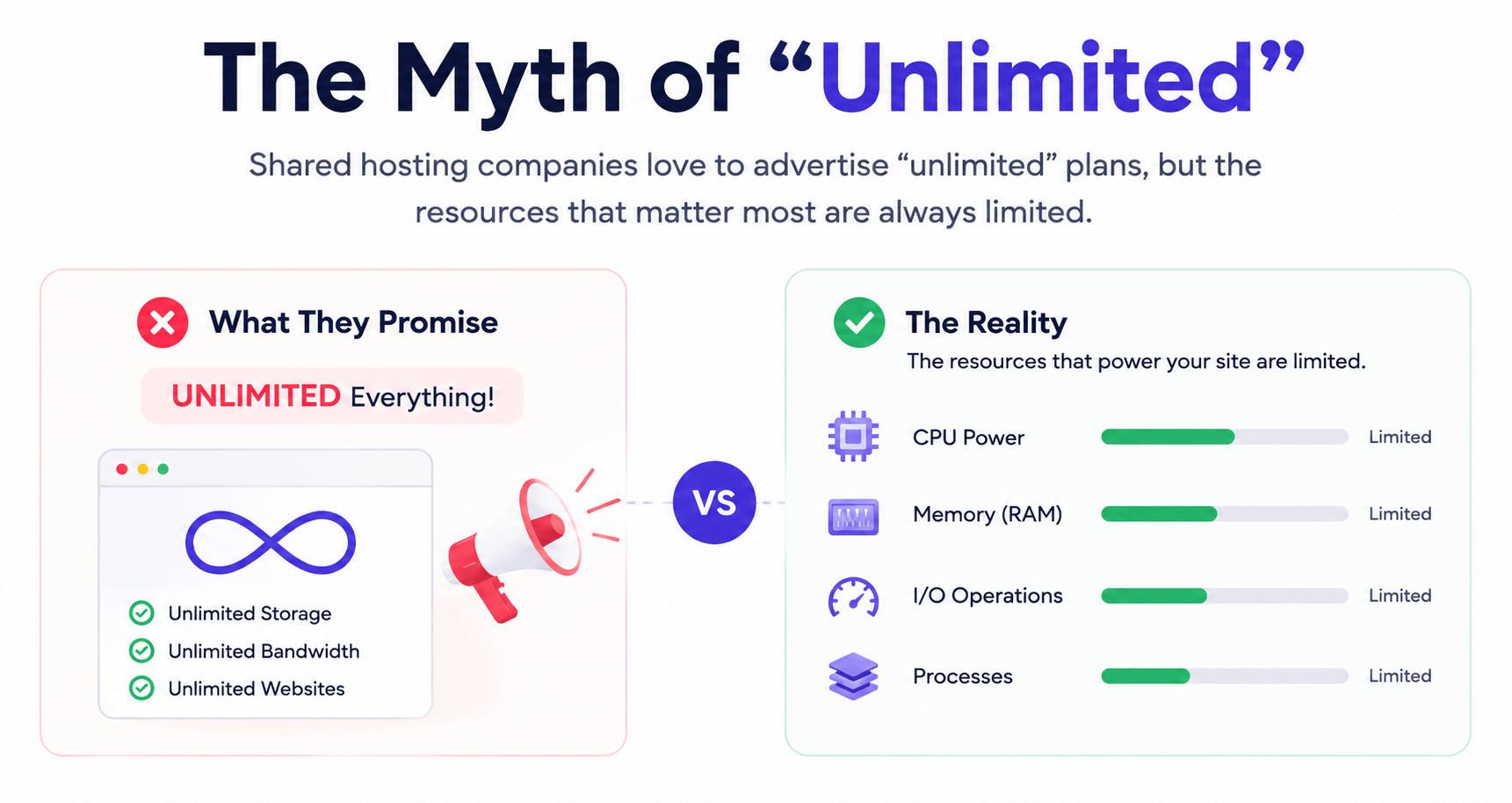
Shared hosting companies love to advertise “unlimited” plans, but the promise rarely extends to the resources that matter most. While storage may seem unlimited, CPU power and memory are always limited, and those are what WordPress relies on to serve visitors. As you add page builders, WooCommerce, or other demanding plugins, your site needs more processing power.
When traffic increases, shared hosts often throttle those resources, leading to slow pages and frustrating delays. Many site owners respond by adding caching plugins or replacing their theme, but those fixes only go so far. Sometimes the real solution is accepting that the best VPS hosting isn’t a luxury upgrade – it’s the point where your website finally gets the resources it needs to perform consistently.
The problem is that these limits aren’t always obvious until a website starts growing. A site might run smoothly for months, then suddenly become sluggish after a successful marketing campaign, a seasonal traffic spike, or the addition of a few new features. Nothing is technically “broken” – the hosting account is simply running out of the processing power needed to keep up. That’s why many performance issues seem to appear without warning, even when no big changes have been made to the site itself.
Hosts rarely limit disk space first because storage is relatively inexpensive. Instead, they enforce limits on CPU seconds, concurrent processes, memory usage, and input/output operations. These technical restrictions have a direct impact on user experience. A homepage may load quickly in the morning but struggle during peak hours because the account has quietly reached its allocated resources. “Unlimited” stops sounding impressive when performance depends on limits that are merely described differently.
Signs You’ve Outgrown Shared Hosting
Not every website needs a VPS from day one. However, if several of these situations sound familiar, your hosting may be holding your site back:
- Your website slows down whenever traffic increases.
- The WordPress dashboard feels sluggish during routine tasks.
- WooCommerce checkout or user login pages take noticeably longer to load.
- You regularly hit CPU, memory, or I/O limits in your hosting dashboard.
- Your site relies on memberships, online courses, forums, or other dynamic features.
- Scheduled tasks, backups, or imports affect your site’s responsiveness.
- Performance issues persist even after optimizing images, enabling caching, and removing unnecessary plugins.
- Core Web Vitals remain inconsistent despite frontend optimization.
If you’re checking multiple boxes, improving the infrastructure will likely have a greater impact than squeezing more performance out of the application itself.
Neighbors, Noise, and the CPU Lottery
Shared hosting makes performance unpredictable. The account doesn’t just share a server. It shares fate. Another tenant runs a bloated store. Someone else gets hit with a bot flood. A third person imports a huge backup at noon. The server groans, and every innocent site suffers. This isn’t drama. It’s physics. The CPU can’t serve ten hungry apps at once without something going hungry. WordPress displays slow admin screens and random timeouts that never appear in testing. Same code. Worse neighbors.
This unpredictability creates one of the hardest performance problems to troubleshoot because the issue may disappear before anyone investigates it. Monitoring tools can show brief spikes in response times without revealing that another customer triggered them. Developers end up chasing phantom bugs while hosting providers see nothing unusual. The website appears unreliable even though the underlying application hasn’t changed, making shared hosting a frustrating environment for businesses that require consistent uptime and customer confidence.
The Hidden Business Cost of Slow Hosting
Slow hosting affects far more than loading times. It shapes how visitors experience your business.
A delay of just a few seconds can increase bounce rates, reduce conversions, and create friction during important actions like purchases or form submissions. Search engines also consider page experience when evaluating websites, making consistent performance an important part of long-term SEO.
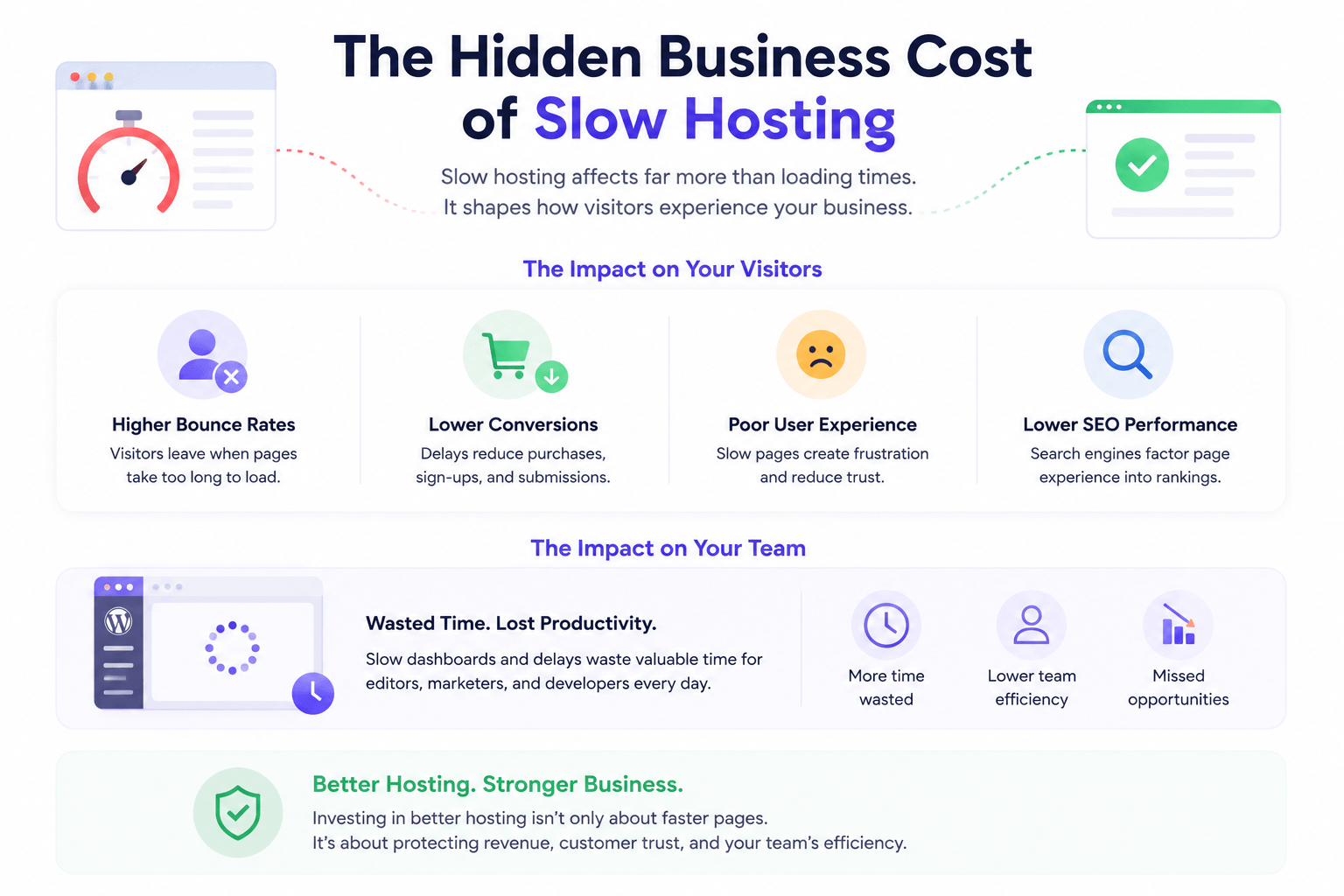
The impact extends beyond visitors. A slow WordPress dashboard wastes valuable time for editors, marketers, and developers every single day. As a website grows, those small delays add up to lost productivity and missed opportunities. Investing in better hosting isn’t only about faster pages. It’s about protecting revenue, customer trust, and your team’s efficiency.
Scaling Isn’t Just Traffic; It’s Complexity
Traffic growth scares people because it looks measurable. The sneakier problem is feature growth. A site adds memberships. Then courses. Then, the multilingual content. Then a CRM sync. Each moving part increases database chatter and background work. Shared hosting hates background work. It hates long queries. The result looks like a site that runs, yet feels fragile and unpredictable. A VPS offers dedicated CPU and RAM, plus control over PHP versions, caching layers, and server rules. Control matters because it stops the host from treating a serious site like a hobby blog.
What can catch site owners off guard is that visitors only see part of the workload. Every page request can trigger multiple processes behind the scenes, from checking user permissions and generating dynamic content to writing database records and running scheduled tasks. None of this is obvious to the visitor, but it competes for the same pool of server resources, gradually pushing a shared hosting account to its limits.
WordPress sites also rely on an expanding ecosystem of third-party services. Payment gateways, email marketing platforms, analytics tools, CRM software, and external APIs add convenience, but they increase the amount of work happening behind the scenes. The challenge isn’t one plugin or integration on its own, but the combined load they create over time. Scaling successfully means planning for that growing complexity, rather than simply watching the visitor count.
Is VPS the Only Path? Not Quite
The scaling conversation loves false choices. Shared or VPS. Cheap or expensive. Managed WordPress hosting can beat a bargain VPS, because good providers tune caching, backups, and security with discipline. Cloud platforms can scale hard, though they demand sharper skills and budgets. Dedicated servers still matter for projects that want predictable strength. VPS is often the key choice. It offers isolation without the sticker shock. It also forces a decision about who is responsible. Someone must handle updates, monitoring, and backups. That duty can sit with a team or a managed provider.
The right hosting solution will depend on the site’s priorities rather than its visitor count alone. A small e-commerce store generating steady revenue may benefit from managed infrastructure sooner than a high-traffic hobby blog. Similarly, businesses with strict uptime requirements may value proactive monitoring and expert support more than raw processing power. Choosing hosting should be viewed as a long-term operational decision instead of a race toward the cheapest monthly plan.
Think Beyond Traffic
Many people assume hosting upgrades are only necessary when visitor numbers explode. In reality, website complexity often grows faster than traffic.
A membership platform with 500 daily users can place more demand on a server than a blog receiving 20,000 visits. Logged-in users, dynamic content, payment processing, API requests, and personalized dashboards all require additional server resources that caching cannot fully eliminate.
That’s why the right time to upgrade isn’t determined by traffic alone. It’s determined by the workload your website handles every day.
Shared Hosting vs. VPS at a Glance
| Feature | Shared Hosting | VPS Hosting |
|---|---|---|
| Server Resources | Shared with other accounts | Dedicated allocation |
| Performance | Can fluctuate depending on neighboring sites | More consistent and predictable |
| Customization | Limited server access | Greater control over PHP, caching, and server configuration |
| Scalability | Suitable for smaller websites | Better suited for growing or resource-intensive websites |
| Cost | Lower monthly expense | Higher investment with better performance potential |
| Best For | Personal blogs, portfolios, and small business websites | WooCommerce stores, membership sites, learning platforms, agencies, and growing businesses |
A Simple Migration Checklist
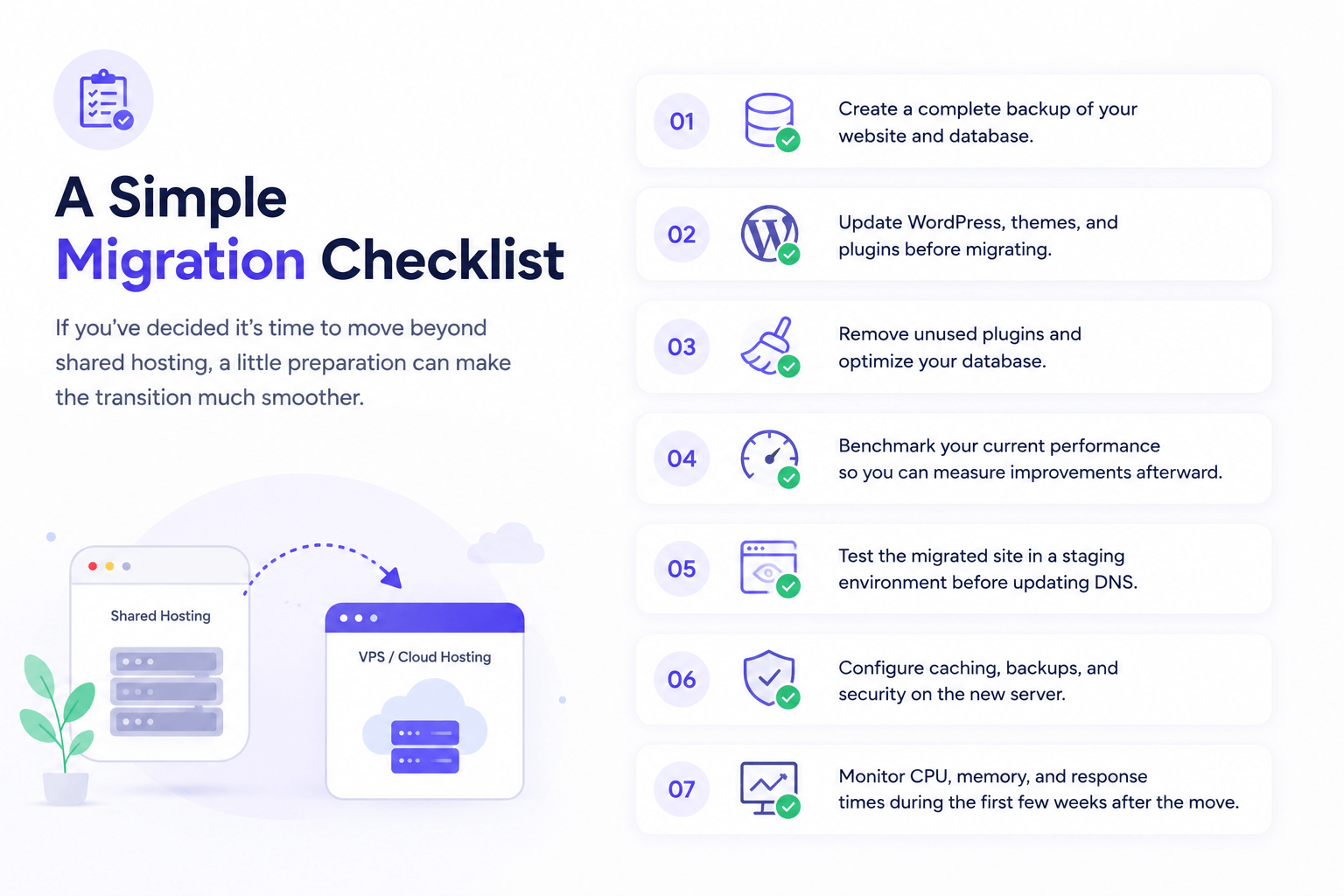
If you’ve decided it’s time to move beyond shared hosting, a little preparation can make the transition much smoother.
- Create a complete backup of your website and database.
- Update WordPress, themes, and plugins before migrating.
- Remove unused plugins and optimize your database.
- Benchmark your current performance so you can measure improvements afterward.
- Test the migrated site in a staging environment before updating DNS.
- Configure caching, backups, and security on the new server.
- Monitor CPU, memory, and response times during the first few weeks after the move.
Treat migration as an opportunity to improve your entire hosting strategy, not just change providers.
Conclusion
Shared hosting isn’t evil. It’s designed for the early stage, when a WordPress site resembles a brochure rather than a business engine. The moment revenue, reputation, or user trust depends on consistent speed, shared hosting becomes a liability. Throttling doesn’t announce itself. It creeps in as missed orders and abandoned carts. VPS won’t fix sloppy plugins or a database stuffed with junk. Yet it changes the rules. It replaces the CPU lottery with an allocation. It replaces vague limits with knobs. Scaling WordPress means scaling the environment and the discipline around it. Serious sites don’t just need more power. They need fewer surprises.
The smartest migrations happen before hosting becomes an emergency. Waiting until performance collapses means troubleshooting under pressure while customers experience the consequences. By treating hosting as part of the site’s growth strategy rather than an afterthought, businesses gain room to optimize, test new features, and handle demand. WordPress is capable of powering enormous websites, but only when the infrastructure beneath it evolves alongside the ambitions of the people running it.




 Email Subscription Request


Add your first comment to this post