

 0
0 Choosing between Shopify Plus vs WooCommerce starts with one question, not a feature list: how much of your store’s plumbing do you want to own, and how much do you want someone else to run? Shopify Plus is a fully managed enterprise platform; WooCommerce is a free, open-source plugin you host and maintain yourself. Both can run a serious store. The right answer turns on operational load — who keeps the site up during a traffic spike, who patches security, and how far you need to bend the checkout.
WooCommerce leads the market by store count, roughly a third of all online stores, while Shopify shows up more often among the largest, highest-traffic brands. That split is the whole comparison in miniature.
The Same Goal, Very Different Foundations
Both platforms exist to sell products online, but they start from opposite models. The difference appears the moment hosting, security, or deep checkout changes enter the picture.
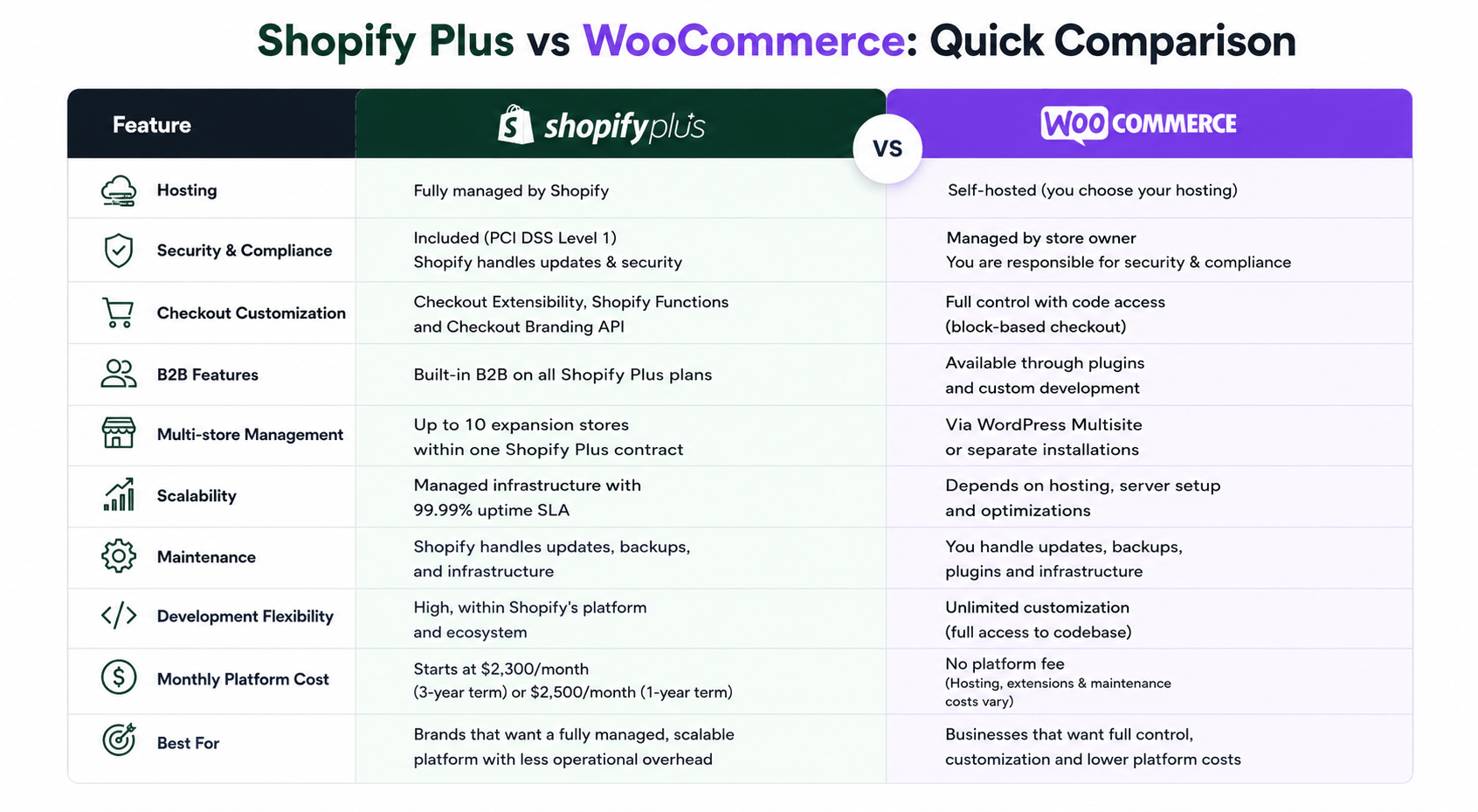
- Shopify Plus: hosted and managed. Shopify runs the servers, handles PCI compliance, and guarantees 99.99% uptime, with Checkout Extensibility, B2B features, larger API budgets, and up to ten stores on one contract.
- WooCommerce: self-hosted and open-source. The core plugin is free, and the code is yours to change, but hosting, security, backups, caching, and updates all become your responsibility.
Where the Development Experience Actually Diverges
Shopify Plus development stays close to Shopify’s own model — its languages, its APIs, its checkout surface. WooCommerce development hands you the full codebase, which means more freedom and more ownership of whatever breaks. Teams that build on both keep that trade-off front of mind. Shopify Plus website development services focus on checkout extensions, Functions, and API integrations, while WooCommerce development services focus on hosting, caching, security, and custom PHP.
Checkout Customization (Checkout Extensibility vs Custom Code)
Shopify Plus reserves the deepest checkout work for its plan. Checkout Extensibility, Shopify Functions, and the Checkout Branding API cover validation rules, discount logic, payment presentation, and branded UI on the information, shipping, and payment steps. Functions also handle backend rules like cart validation, delivery conditions, and bundles. WooCommerce gives you the checkout in code through its block-based checkout, with no plan gate on what you can touch. The freedom is real, and so is the upkeep, since a custom checkout you wrote is one you test and secure yourself.
API Limits and Integration Complexity
On Shopify Plus, integrations run against managed APIs with larger budgets. The GraphQL Admin API restores far faster on Plus than on standard plans, and Shopify absorbs the infrastructure when ERP, PIM, 3PL, and BI systems all sync at once. On WooCommerce, the WordPress and WooCommerce REST APIs run on hosting you control, so your integration ceiling is really your server’s ceiling. The 2026 default of High-Performance Order Storage (HPOS) moves orders into dedicated indexed tables and removes the biggest bottleneck high-volume Woo stores used to hit. The practical difference is simple: Shopify governs your rate limits, while WooCommerce turns them into a hosting decision.
Performance and Scalability
Both platforms can support high-volume ecommerce stores, but they approach performance differently.
Shopify Plus uses a managed infrastructure designed to handle traffic spikes automatically. Brands do not need to configure caching, monitor servers, or scale resources during major sales events.
WooCommerce performance depends heavily on hosting quality and optimization. Modern WooCommerce stores can scale successfully with technologies such as:
- High-Performance Order Storage (HPOS)
- Object caching with Redis
- Content delivery networks (CDNs)
- Dedicated or cloud-based hosting
- Optimized database configurations
The difference is not whether either platform can scale. It is who is responsible for making that scalability happen.
B2B, Expansion Stores, and Multi-Region Setup
Shopify Plus ships B2B as a first-class feature — wholesale catalogs, company and location records, account-level buying rules — plus up to ten stores on one contract for regional growth. WooCommerce reaches the same outcomes through plugins and WordPress multisite, which bends to unusual requirements but adds integration and maintenance work. Weber runs detailed product content alongside its store on Woo, while brands like Allbirds use Plus to keep online and retail inventory in sync across markets.
Real-World Use Cases – Which Platform Is Suitable for You
The right platform often depends on the type of business you operate.
When Shopify Plus Makes More Sense
Imagine a fashion brand selling across North America, Europe, and Asia. The business needs multiple storefronts, localized experiences, and reliable performance during major promotions.
In this situation, Shopify Plus can reduce operational complexity because hosting, security, uptime, and infrastructure scaling are already handled.
When WooCommerce Makes More Sense
Consider a wholesale manufacturer with customer-specific pricing, custom approval workflows, and unique ordering requirements.
WooCommerce may be the better fit because developers can customize virtually every part of the shopping experience without platform restrictions.
When Existing WordPress Content Matters
Many businesses generate significant traffic through effective content marketing.
If your website already runs on WordPress and content drives a large portion of sales, WooCommerce allows you to manage content and commerce from a single platform. This often simplifies workflows and reduces the need for third-party integrations.
What Each Platform Costs and When It Pays Off
Shopify Plus starts at $2,300 per month on a three-year term or $2,500 on a one-year term, with a variable component for very high volume. That fee includes hosting, security, and support, but apps and development push real monthly spend to roughly $5,000-$25,000 for many stores, and an outside payment gateway adds a 0.15-0.20% surcharge on top of card fees. WooCommerce charges nothing for the plugin, yet managed hosting ($15-$150/mo), premium extensions ($500-$2,500/yr), and maintenance (free in-house, or $200-$2,000/mo on a retainer) make up the real bill.
Above roughly $100,000 in annual sales, WooCommerce’s missing platform fee and lower payment overhead often make it the cheaper option, provided you can absorb the upkeep. Below that, or without in-house engineering, the all-in model behind Gymshark and other high-volume Plus brands usually earns its premium by removing the operational load entirely.
Signs You’ve Outgrown Your Current Platform
A platform mismatch shows up as recurring friction, not a single failure. Watch for these signals:
- Most of your Plus budget goes to working around checkout or data limits you cannot reach, when full code control would have been cheaper.
- Your team spends more time firefighting WooCommerce hosting, security, and plugin conflicts than improving the store.
- The site slows or crashes at peak, and the cause traces back to hosting you own rather than the platform itself.
- App and gateway fees on Plus have quietly grown past what a self-hosted stack plus a developer retainer would cost.
- You need deep, unusual customization and keep hitting a plan gate on Plus.
- You want predictable operations but keep hitting maintenance on WooCommerce that you never budgeted for.
What to Expect From the Migration
Switching between these platforms is a rebuild, not a settings change, because the data models and checkout systems do not map one-to-one. Typical timelines look like this:
- Fast move, 2-4 weeks: clean catalog, simple flows, no custom checkout rebuild.
- Standard build, 1-2 months: custom checkout logic, B2B rules, and several integrations.
- Complex migration, 3-6 months: ERP/PIM/3PL work, regional stores, or historical data.
Run it through three checks regardless of direction: audit what you actually use, rebuild and test it on the new platform, then watch checkout conversion, payment failures, and sync behaviour for the first 30 days. The platform worth choosing in any Shopify Plus vs WooCommerce decision is the one whose ongoing cost, in fees and in engineering hours, your business can carry a year from now.
Final Decision Framework – How to Choose the Right Platform
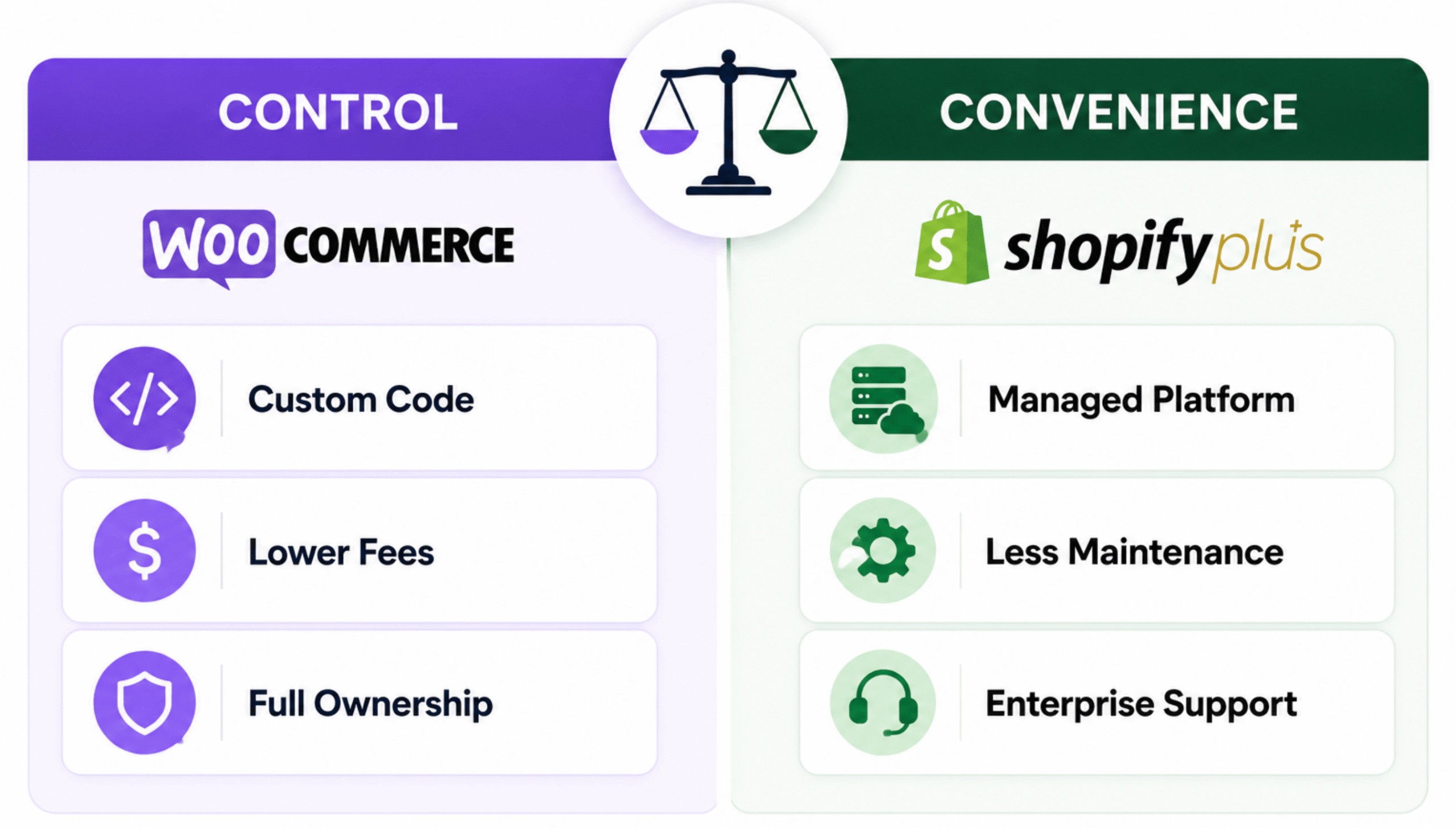
Before switching platforms, ask three simple questions:
1. How much control do you need?
If your business requires deep customization and unique workflows, WooCommerce usually provides more flexibility.
If your requirements fit within Shopify’s ecosystem, Shopify Plus often delivers faster implementation and lower operational overhead.
2. Who will maintain the platform?
If you have developers and technical resources available, WooCommerce can offer greater long-term freedom.
If you prefer a managed environment with fewer maintenance responsibilities, Shopify Plus is typically the safer choice.
3. What will this cost two years from now?
Do not compare only today’s expenses.
Consider:
- Platform fees
- Development costs
- Hosting expenses
- Maintenance requirements
- App subscriptions
- Payment processing fees
The cheapest platform today is not always the cheapest platform at scale.
Conclusion
Shopify Plus and WooCommerce can both power large, successful ecommerce businesses. The better choice depends on whether your priority is operational simplicity or complete control.
Shopify Plus reduces the burden of infrastructure, security, and maintenance, making it attractive for fast-growing brands that want a managed platform. WooCommerce offers unmatched flexibility and ownership, making it a strong choice for businesses with custom requirements and technical resources.
Before making the switch, audit your current costs, integrations, workflows, and growth plans. The best platform is not the one with the longest feature list. It is the one your team can operate efficiently as your business grows over the next several years.




 Email Subscription Request


Add your first comment to this post