

 0
0 You turn on automatic translation in TranslatePress, pick Google Translate, and then find out you need a Google Cloud project with billing switched on before a single word gets translated. Loco Translate sends you down the same road. The TranslateX API for Loco Translate and TranslatePress offers a different arrangement, one flat monthly fee with no character meter running in the background. This review looks at whether that arrangement holds up.
Quick Navigation
TLDR
- TranslateX charges a flat monthly price for unlimited translations. Google Cloud Translation gives you 500,000 characters free every month and then charges $20 per million. DeepL restructured its API plans in 2026 and no longer sells the tier most WordPress guides still quote.
- GTranslate published its own benchmark on GitHub. It shows TranslateX finishing behind Google Translate and DeepL on quality. The gap is small and they published it anyway.
- The free plan is real, but it bars commercial use, caps you at 35 languages, and lets GTranslate keep your text for model training.
- The TranslatePress connector is properly built. The Loco Translate connector is a 1.0 with gaps worth knowing about first.
- Both connectors use roughly half of what the TranslateX API can actually do.
What TranslateX Is and Who Builds It
TranslateX is a hosted neural machine translation API from GTranslate Inc, the company behind the long-running GTranslate WordPress plugin. It is not a WordPress plugin itself. It is an API that other software talks to.
Two free connector plugins on WordPress.org bring it into WordPress. TranslateX for TranslatePress adds TranslateX as an engine option inside the TranslatePress Automatic Translation settings. TranslateX for Loco Translate adds it as a provider inside Loco’s translation editor.
Your text travels over HTTPS to api.translatex.com and gets processed on servers in the United States and the European Union. That matters for anyone with a GDPR obligation, and we come back to it in the plan section.
How Good the TranslateX Translations Actually Are
The honest answer is: the published benchmark suggests that TranslateX is competitive with Google Translate and DeepL for the specific English-to-Spanish test it ran.
TranslateX publishes a comparison between its Free and Paid models, Google Translate, and DeepL. The evaluation used:
- FLORES-Plus DEVTEST
- English-to-Spanish translation
- BLEU and SacreBLEU
- COMET
- GPT-4.1 and Claude 4 as model-based evaluators
- A blind human evaluation
Published results:
| System | SacreBLEU | COMET | Blind human evaluation |
|---|---|---|---|
| TranslateX Free | 28.26 | 0.8485 | 93.87 |
| TranslateX Paid | 28.93 | 0.8670 | 96.33 |
| DeepL | 27.28 | 0.8700 | 96.50 |
| Google Translate | 27.92 | 0.8745 | 97.27 |
TranslateX Paid scores highest on SacreBLEU in this comparison. Google leads on COMET and the blind human score, while DeepL sits between Google and TranslateX on those two measures.
The more useful takeaway is that TranslateX Paid sits close to Google and DeepL in this specific English-to-Spanish evaluation. Google leads TranslateX Paid by 0.94 points on the published human-evaluation score. That gap looks small in the published results. However, it is still important not to overstate what the benchmark proves.
One important limitation: It covers one language pair.
English-to-Spanish is only one translation direction. These results do not tell us how TranslateX compares with Google or DeepL for Bengali, Swahili, Urdu, Thai, or other language pairs.
How TranslateX Pricing Compares to Google Translate and DeepL
TranslateX replaces per-character billing with a flat monthly fee, and replaces character caps with a limit on how many API calls you can make per minute.
| Service | Cost | Cap |
|---|---|---|
| TranslateX Free | $0 | 50 calls per minute, unlimited characters |
| TranslateX Startup | $19.99 per month | 50 calls per minute, unlimited characters |
| TranslateX Business | $29.99 per month | 75 calls per minute, unlimited characters |
| TranslateX Enterprise | $39.99 per month | 100 calls per minute, unlimited characters |
| Google Cloud Translation | First 500,000 characters each month free, then $20 per million | Metered, no ceiling |
| DeepL API | See note below | Metered, no ceiling |
New DeepL signups get a Developer allowance of one million characters in total, which is a one-time amount rather than a monthly one, or a Growth plan starting around $26 a month with an annual character bundle included. Worth knowing too that TranslatePress only offers DeepL on its paid licences, so the free version of TranslatePress never had that option anyway.
One more thing both metered services have in common. They bill on the characters you send, and that includes spaces and any HTML markup in the string. On content-heavy pages, the markup can add meaningfully to a bill that looked fine on a word count.
Now the part that works against TranslateX, and Google’s free allowance makes it sharper. TranslatePress translates each unique string once and stores the result in your database, so it never pays to translate the same sentence twice. A 200-page site burns through a chunk of characters on the first bulk run and then settles into almost nothing.
Once your monthly usage drops under 500,000 characters, Google costs you nothing at all. A site that gets translated at launch and then publishes a few posts a month may well sit inside that free allowance permanently, in which case any subscription is money you did not need to spend. The catch is the setup, since getting a Google Translate key working in WordPress takes more steps than pasting one string into a settings field.
The flat fee wins in three situations. Sites that publish constantly, so new strings keep arriving. Agencies running many client sites through one key. And anyone who wants a predictable bill more than they want the cheapest possible bill.
What Each TranslateX Plan Includes
The free plan is genuinely free and genuinely limited.
| Free | Startup | Business | Enterprise | |
|---|---|---|---|---|
| Languages | 35 | 50 | 50 | 50 |
| Model | Small, CPU | Large, GPU | Large, GPU | Large, GPU |
| Commercial use | No | Yes | Yes | Yes |
| Privacy mode | No | Yes | Yes | Yes |
| Language detection | No | No | Yes | Yes |
| HTML translation | No | No | No | Yes |
Two restrictions on the free plan matter more than the rest. Commercial use is not permitted, which rules out most WordPress sites that have a shop, a service page, or ads on them. And on the free plan, your submitted content and its translations may be stored and used to train GTranslate’s models. Paid plans process text in memory and retain nothing. If you handle anything confidential, the free plan is not the place for it.
How to Set Up TranslateX in TranslatePress
Four steps, and the fourth is the one people skip.
Install TranslatePress and TranslateX for TranslatePress from the WordPress plugin directory, then activate both. It works with the free version of TranslatePress as well.
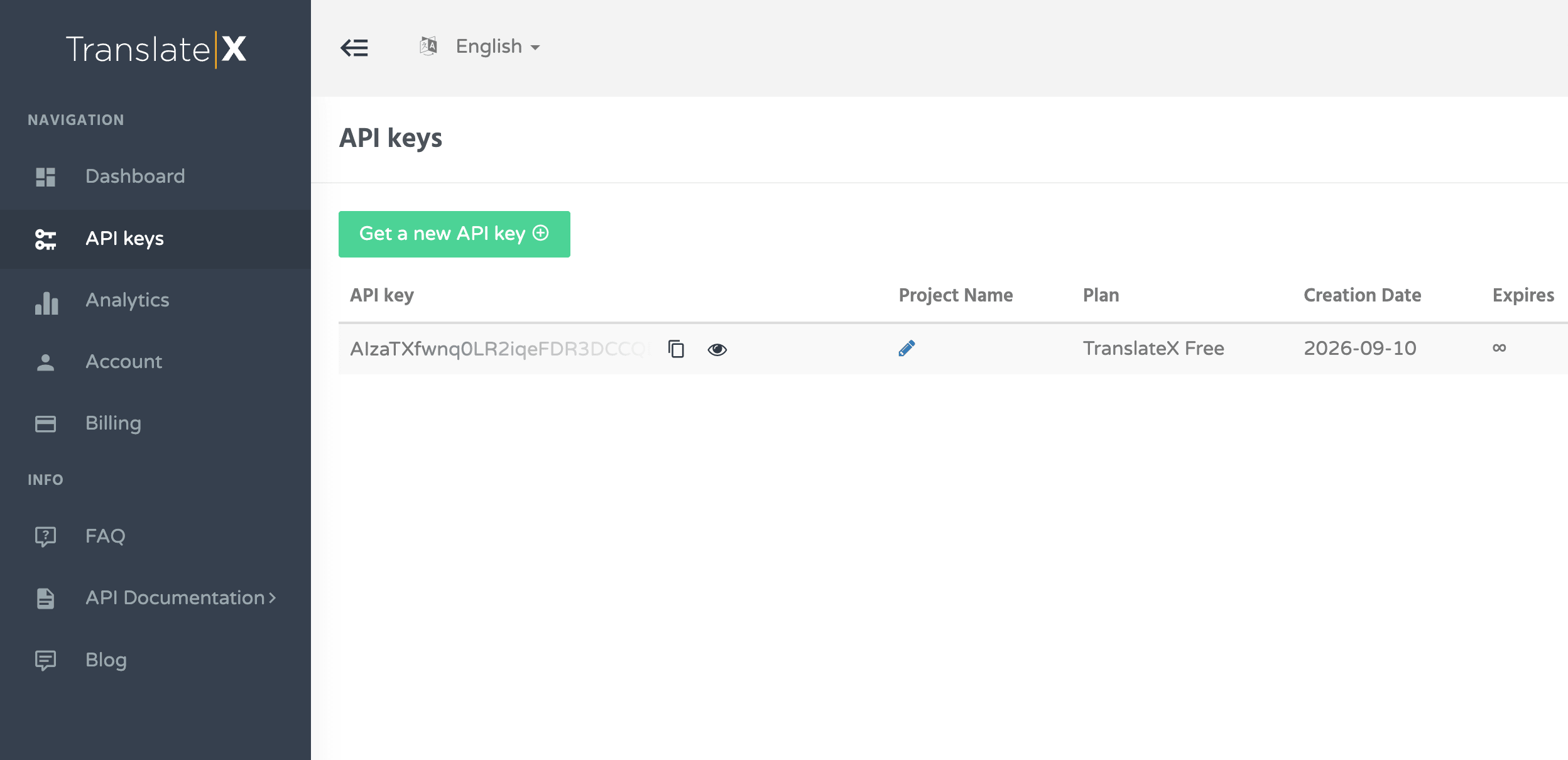
Sign up at translatex.com and copy your API key.
Go to Settings, then TranslatePress, then Automatic Translation.
Select TranslateX as the engine and paste your key.
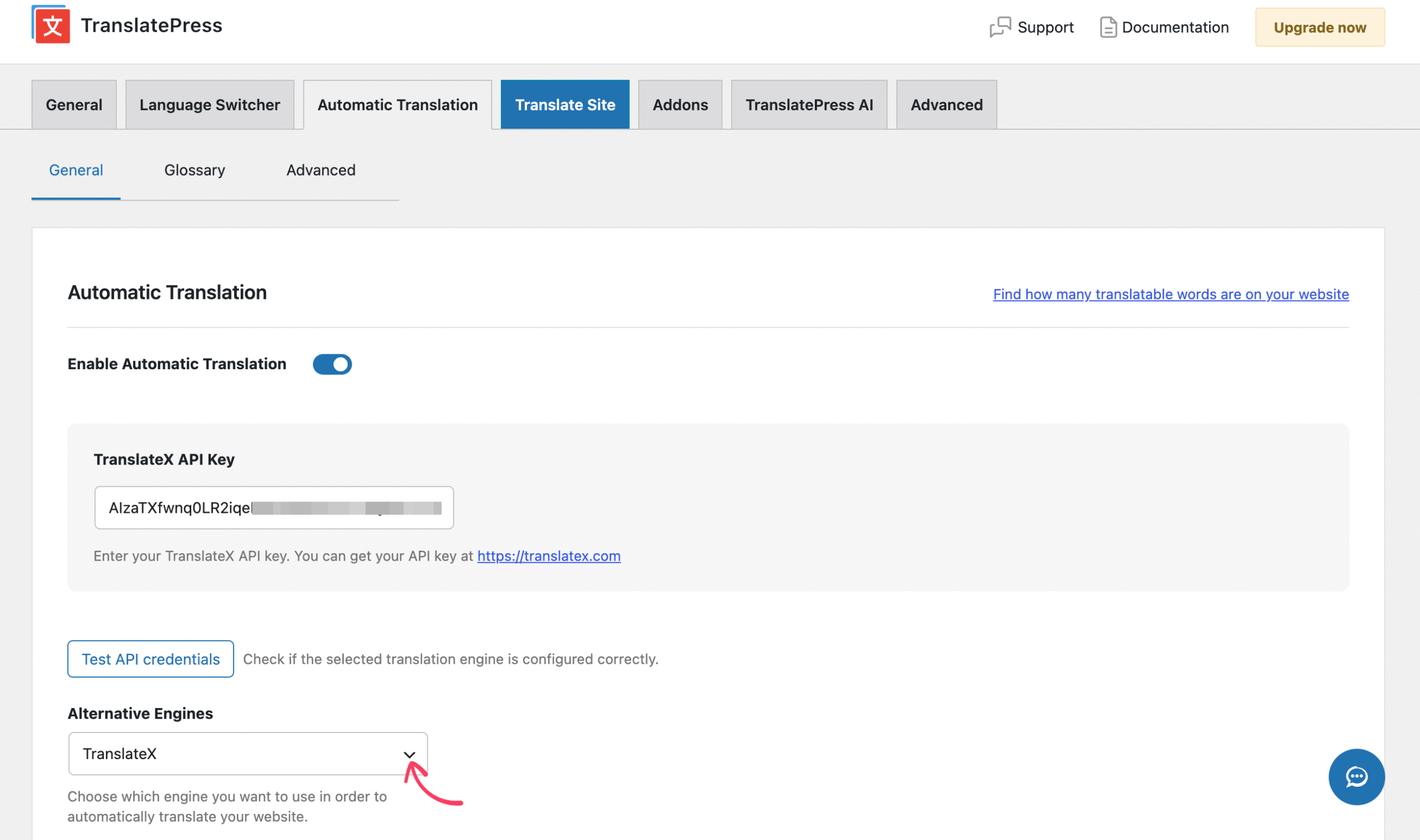
The plugin runs a live test against the API and shows you the error message if the key is wrong.
Find the setting labelled “Limit machine translation / characters per day” and either switch it off or raise it a long way. TranslatePress defaults to one million characters per day, and that cap applies to TranslateX exactly as it applies to a metered engine.
That last step is not optional advice. The connector reports every translated chunk to TranslatePress’s own quota counter and stops sending requests the moment the daily limit trips. Leave the default in place and your bulk translation will halt part way through with no obvious reason.
How to Set Up TranslateX in Loco Translate
Loco Translate does a different job, and mixing the two up is the most common mistake here. TranslatePress translates what visitors see on your pages. Loco Translate edits the .po and .mo language files that themes and plugins ship with. If your goal is a multilingual website, you want the TranslatePress route.
Install Loco Translate and TranslateX for Loco Translate, then activate both.
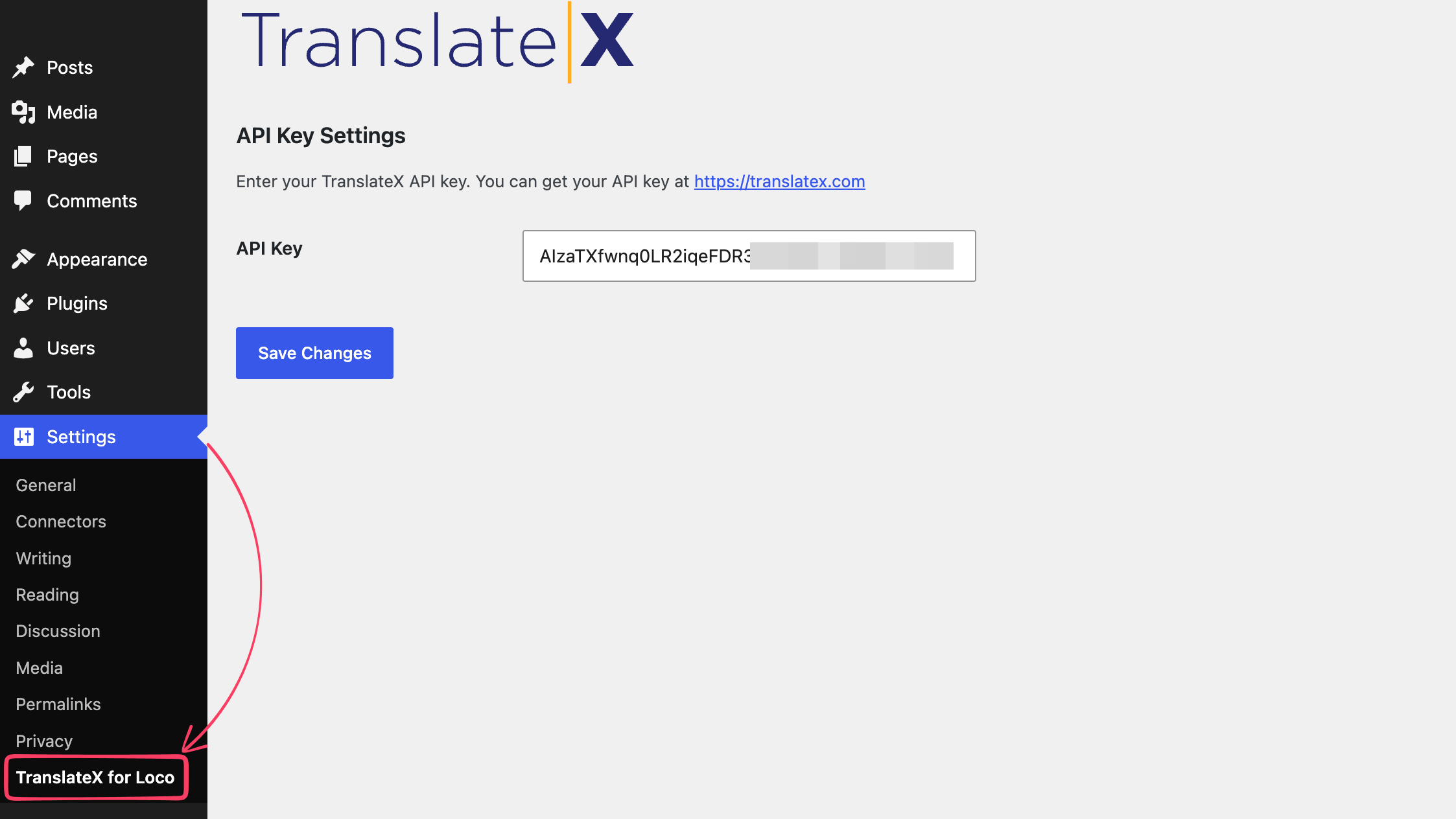
Go to Settings, then TranslateX for Loco, and paste your API key there. This is a separate screen from Loco’s own settings.
Open Loco Translate, pick a theme or plugin, and choose your target language.
Use bulk translation, or translate individual strings from the editor.
Who Should Use the TranslateX API for Loco Translate and TranslatePress
Best for a TranslatePress site that publishes often. The connector is solid, the flat fee makes sense once new content keeps arriving, and quality sits close enough to Google that visitors will not notice. Start on Startup at $19.99, not on Free, unless your site is genuinely non-commercial.
Best for agencies running several client sites. One predictable line item beats reconciling Google Cloud billing across a dozen projects. Watch the rate limit, since one key covers all of them.
Best for a personal or hobby project. The free plan is a fair way to get a multilingual site running at no cost, as long as you accept the smaller model and the training clause.
Think twice if you translate once and stop. A brochure site that gets translated at launch and rarely changes will probably spend less on metered Google billing than on any monthly subscription. If you have not settled on a host plugin yet, it is worth comparing the main multilingual plugins before you pick a translation engine to sit behind one.
Frequently Asked Questions
Does TranslateX re-translate the same text every time someone loads a page?
No. TranslatePress translates each unique string once and saves the result in your WordPress database, then serves it from there. The API only gets called again when the source content changes or new content appears.
What happens to my translations if I cancel TranslateX?
You keep them. TranslatePress stores translations in your own database and Loco Translate writes them into .po and .mo files on your server. Cancelling stops new translations, not existing ones.
Will switching to TranslateX erase translations I already made with Google or DeepL?
No. Existing translations stay in the database untouched and continue to work. TranslateX only handles strings that have not been translated yet.
Can I use one TranslateX API key on more than one website?
Technically nothing in the plugin code or the API documentation ties a key to one domain, but check the TranslateX terms of service before you rely on that, since we have not reviewed them. Either way the rate limit applies per key, so several busy sites sharing one key compete for the same 50 calls a minute. GTranslate’s own suggestion for more headroom is to buy extra keys and spread requests across them.
Is the free plan really unlimited?
Unlimited in characters, yes. It is still capped at 50 API calls per minute, limited to 35 languages and the smaller model, and it is not licensed for commercial use.
Why did my bulk translation stop part way through?
On TranslatePress, the most likely cause is the daily character limit, which defaults to one million and applies regardless of which engine you picked. The other possibility on either plugin is the per-minute rate limit, which neither connector surfaces in the interface.
The Verdict
The TranslateX API for Loco Translate and TranslatePress is a fair deal built on an honest foundation. A vendor that publishes a benchmark showing it in third place has earned some trust, and the price argument stands on its own for sites that keep publishing.
If you run TranslatePress, get a free key, test it against your own content in your own language pair, and upgrade to Startup before you go commercial. If you run Loco Translate, wait for the next release.
Whichever engine you land on, translated pages only earn their keep once the multilingual SEO around them is set up properly.





 Email Subscription Request


Add your first comment to this post