

 0
Following a WordPress SEO checklist matters more than ever when you publish AI-assisted content. WordPress is one of the most accessible platforms for bloggers, content writers, and website creators. In fact, 39.6% of all websites use WordPress for content management and other services.
Nonetheless, while WordPress is a very helpful tool for writers, it is deliberately designed with a simple interface and basic editing features. It will publish whatever you give it without checking the quality.
So, when it comes to publishing AI-assisted content on WordPress, you must be careful about quality and accuracy, especially since a lion’s share of online content is now produced with the help of AI.
Moreover, if you want a well-crafted, SEO-optimized blog that performs well in SERPs, AI-generated content may cause trouble due to lower-quality writing and inaccurate information.
So, here is a non-negotiable checklist for making your AI-assisted content SEO-friendly and publishing it safely:
- Detect and edit AI-generated text
- Research your audience and their pain points
- Fact-check every claim, number, and source
- Integrate keywords, links, and metadata properly

Detect AI-Generated Text
When you edit AI-assisted content for publication, the first and foremost thing to do is run an AI detection check.
First of all, some text may still look AI-generated or unnatural, even after you edit it. So, it is essential to run a check right before submitting the content for publication.
Secondly, an AI check shows you which parts of a blog post are labeled as AI. It helps you edit those sections directly instead of randomly searching for the portions that need changes.
So, use a trustworthy and well-reputed AI content detector to find the AI-assisted parts of your content. Then, edit them to improve the quality and make the text read naturally before publishing on WordPress.
Keep in mind that AI detectors are not 100% accurate and can flag human-written text too. Treat the score as a guide for where to edit, not as the final verdict.
Research Your Audience
If you want your content to be properly SEO-optimized and get enough visibility and traffic, you have to do thorough research on the intent of the content, your target audience, their pain points, and how they will use the content.
The more your content solves their problems, provides solid and useful information, and shows empathy toward the audience, the better it will perform in search, especially with Google’s evolving algorithm and the growing influence of AI Overviews and chatbot mentions.
Whether you are writing from scratch or with AI assistance, you must know your audience and why they would read your content.
AI can’t automatically research your audience and write the content accordingly, and WordPress won’t do that for you before publishing either.
So, always work on your target audience and their problems, and note them down. It is best to include them in your instructions when you are creating content with AI.
Either way, read the whole piece and check whether your readers’ queries, problems, and pain points are properly addressed.
Fact-Check Every Claim
When it comes to AI, the accuracy of facts, claims, and data is always in question.
Since AI is notorious for hallucinating data and providing false information, you cannot rely on the hard facts it puts in your content.

So, whenever you use AI for content drafting and it provides data or information you don’t already know, check the authenticity of that information.
See if it provided a source. If there isn’t one, avoid using that information. If the AI tool or chatbot does provide a source, check the source’s credibility, find the specific information, and confirm that the claim is accurate.
Alongside that, look into the publisher and the author to check their reputation. Also, check the publication date to make sure the information is up to date.
Integrate SEO Properly
Finally, and most importantly, read the whole piece thoroughly to see whether it is optimized for SEO, AI Overviews, and chatbot mentions, and whether it is ready to perform well in Google Search.
For that, first make sure that all the main keywords, related keywords, and long-tail keywords are properly integrated.
Also, make sure the keywords are not forced into unrelated discussions. Every keyword you add should complement the content or add value to it.
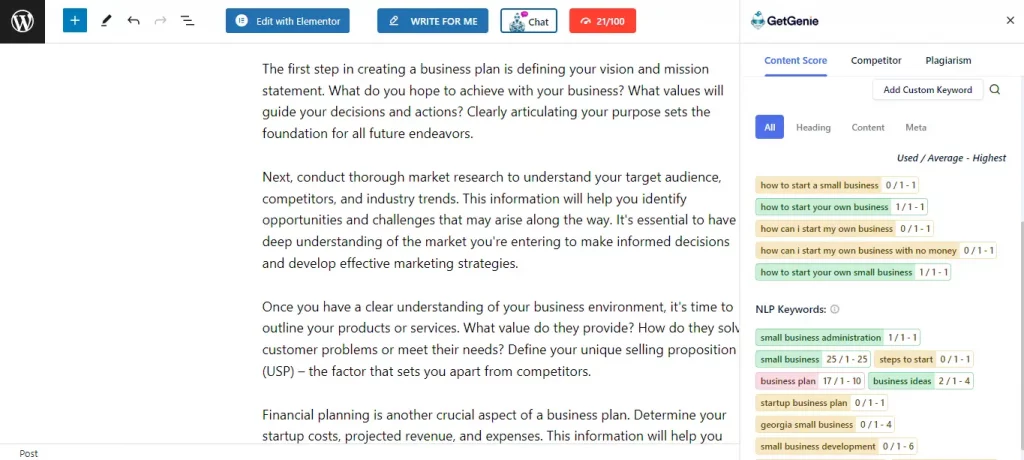
Other than keywords, check every link in your content. Outbound links should point to credible, topically relevant sources, and internal links should guide readers to related posts on your site. Together with a solid link-building strategy, this helps search engines understand and trust your content.
Also, add clean, structured metadata, including the meta title, meta description, and SEO-friendly URLs. An SEO plugin like Rank Math or Yoast SEO makes this easy in WordPress.
However, keep in mind that if your content is genuinely useful, it will perform well in search engines anyway.
A Viable Pathway to Write Content With AI
With this checklist, you can write great content with the help of AI. So, instead of writing the whole piece through AI, follow these four steps to write a blog post with AI.
Make a Structure
AI is a great tool for generating an SEO-friendly blog outline or content structure. Once you have an outline in hand, it speeds up your work and makes the blog easier to complete, without hurting your writing quality.

Brainstorm and Research
With chatbots and other AI tools, you can brainstorm topical ideas, study competitors’ writing strategies, and research the market and your target audience. This way, you might find a fresh perspective or a useful point to include in the content.
Provide a Detailed Prompt
Providing a proper prompt is the most important part of producing AI-assisted writing. If you write a prompt with enough details and specifications for the AI to follow, it will give you a far better result.
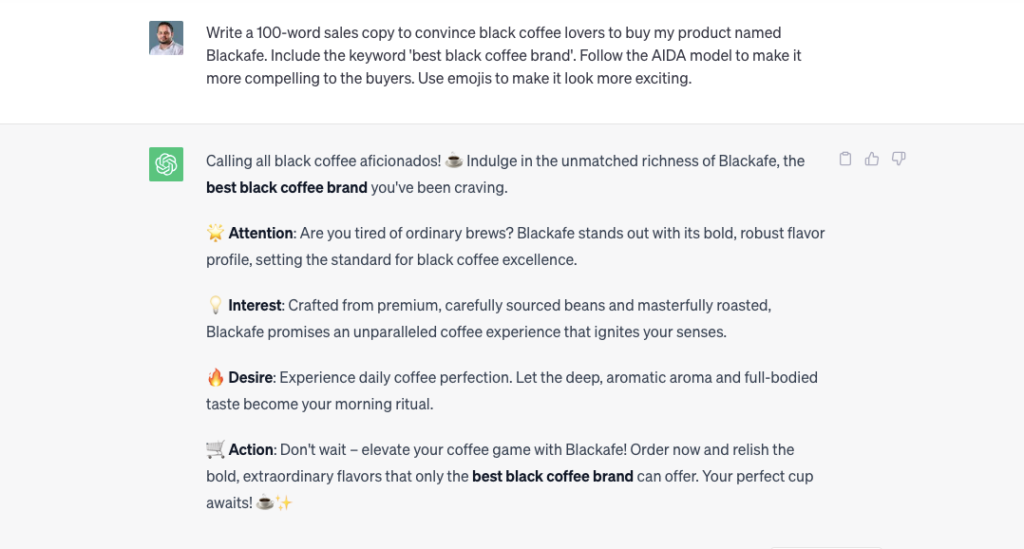
So, include all the information and details you have researched in your prompt, including content ideas, and give specific instructions on how you want the AI to write the first draft.
Edit on Your Own
After getting the draft from AI, this is where you create your own magic. Read the draft thoroughly and edit it where needed. Add your own ideas, personal experiences, and thoughts. Then, rewrite any sentences and wording that seem unnatural to you.
Once you are done editing, give it a final read right before submitting to catch any errors or room for improvement. A blog writing checklist can help you make sure nothing is missed.
Final Thoughts
You can certainly write a good blog post or article with AI while keeping the quality intact. But you must keep its drawbacks in mind and follow certain rules while getting AI assistance.
If you follow the steps above while maintaining this WordPress SEO checklist, you will end up with authentic, human-sounding content that is ready to publish on WordPress. For a deeper review of your whole site, check out our WordPress SEO audit checklist.
Frequently Asked Questions
Does Google penalize AI-generated content?
Not just for being AI-generated. Google rewards helpful, reliable, people-first content however it is produced. However, using AI mainly to mass-produce content to manipulate search rankings violates Google’s spam policies, so quality and originality still matter.
Is it safe to publish AI-assisted content on WordPress?
Yes, as long as you edit it thoroughly. Check it with an AI detector, fact-check every claim, add your own insights and experience, and optimize it for SEO before you hit Publish.
Are AI content detectors accurate?
Not completely. AI detectors can produce false positives and false negatives, so use them to spot sections that need rewriting rather than as proof that content is or isn’t AI-written.
How do I make AI-assisted content SEO-friendly in WordPress?
Research your audience and search intent, integrate primary, related, and long-tail keywords naturally, add relevant internal and outbound links, and write a clear meta title, meta description, and SEO-friendly URL. An SEO plugin such as Rank Math or Yoast SEO helps you handle these on-page elements.
Should I tell readers that my content is AI-assisted?
It is not always required, but Google suggests explaining how content was created where readers would reasonably expect it. Being transparent can also build trust with your audience.
How much should I edit an AI-generated draft?
Edit until the content reads naturally and reflects your own expertise. Rewrite generic or repetitive passages, verify all data, add personal examples, and make sure every section answers your readers’ questions.
Can AI write a complete blog post for me?
It can produce a full draft, but publishing it without editing is risky. Use AI for outlines, research, and first drafts, and rely on your own knowledge for accuracy, originality, and voice.




 Email Subscription Request


Add your first comment to this post